
Appearance
C# 作业
写一个对象池,支持预热、取出、归还、清空
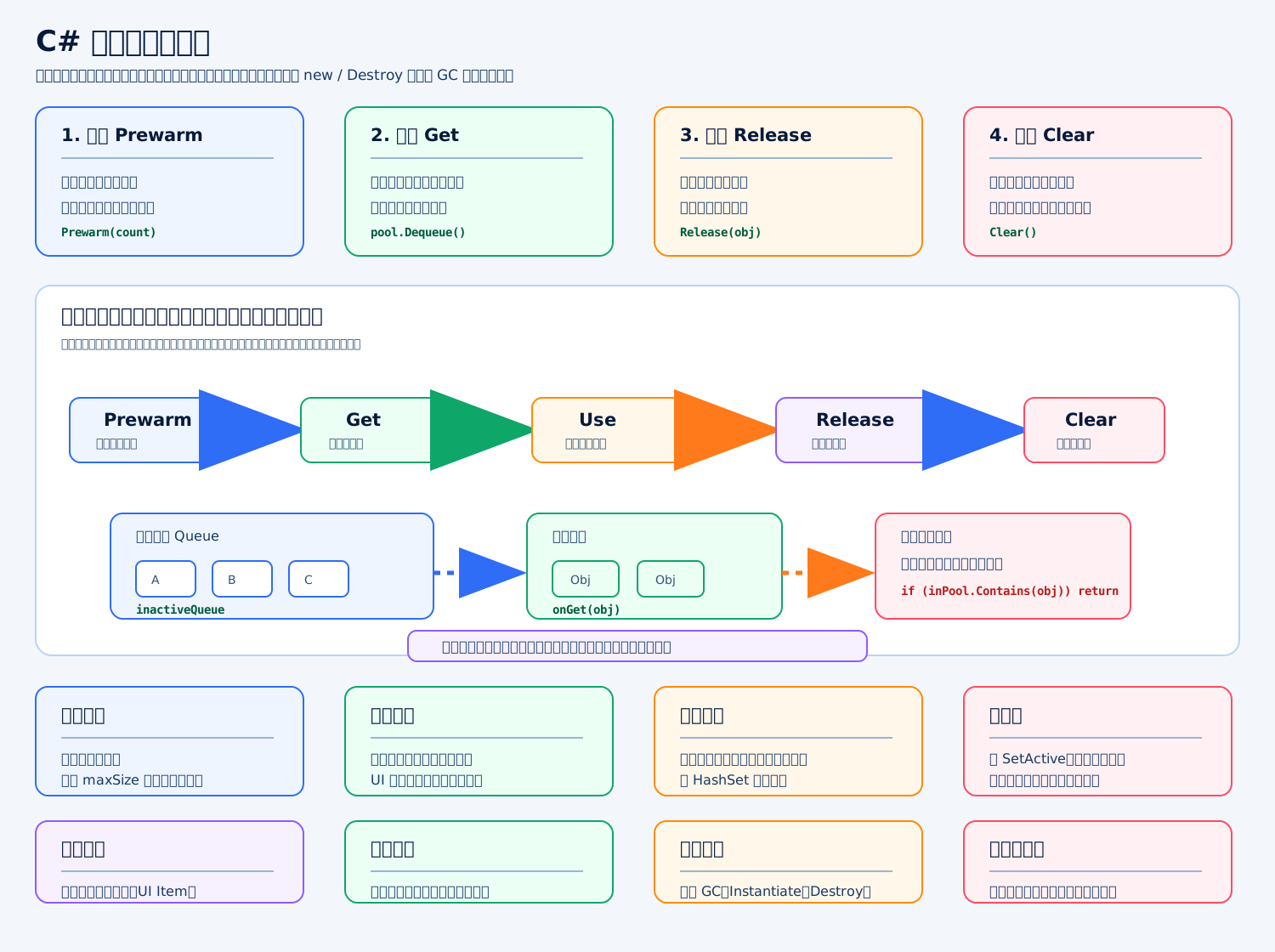
标准答案
这个对象池支持四个核心能力:
Prewarm:提前创建对象。 Get:从池里取对象,没有就扩容。 Release:用完归还,并防止重复归还。 Clear:清空池里管理的对象,适合切场景或退出玩法时调用。
C# 通用对象池
c
using System; // 引入 Func 和 Action 委托
using System.Collections.Generic; // 引入 Queue 和 HashSet 集合

public sealed class ObjectPool<T> where T : class // 定义一个引用类型对象池
{ // 类开始
    private readonly Queue<T> inactiveQueue = new Queue<T>(); // 保存空闲对象的队列
    private readonly HashSet<T> inactiveSet = new HashSet<T>(); // 记录哪些对象已经在池里,防止重复归还
    private readonly HashSet<T> allObjects = new HashSet<T>(); // 记录池创建或管理过的全部对象
    private readonly Func<T> createFunc; // 创建对象的方法
    private readonly Action<T> onGet; // 取出对象时执行的回调
    private readonly Action<T> onRelease; // 归还对象时执行的回调
    private readonly Action<T> onDestroy; // 清空对象时执行的回调
    private readonly int maxSize; // 对象池最大容量
    public int TotalCount => allObjects.Count; // 当前池管理的对象总数
    public int InactiveCount => inactiveQueue.Count; // 当前空闲对象数量
    public int ActiveCount => allObjects.Count - inactiveSet.Count; // 当前正在使用的对象数量

    public ObjectPool(Func<T> createFunc, Action<T> onGet, Action<T> onRelease, Action<T> onDestroy, int initialSize, int maxSize) // 构造对象池
    { // 构造函数开始
        this.createFunc = createFunc ?? throw new ArgumentNullException(nameof(createFunc)); // 保存创建函数并检查空值
        this.onGet = onGet; // 保存取出回调
        this.onRelease = onRelease; // 保存归还回调
        this.onDestroy = onDestroy; // 保存销毁回调
        this.maxSize = Math.Max(1, maxSize); // 保存最大容量,最小为 1
        Prewarm(initialSize); // 构造时按初始数量预热
    } // 构造函数结束

    public void Prewarm(int count) // 预热指定数量对象
    { // Prewarm 开始
        for (int i = 0; i < count; i++) // 循环创建对象
        { // for 开始
            if (allObjects.Count >= maxSize) // 如果已经达到最大容量
            { // 容量判断开始
                return; // 停止预热
            } // 容量判断结束
            T obj = createFunc(); // 创建一个新对象
            allObjects.Add(obj); // 记录到总对象集合
            onRelease?.Invoke(obj); // 让对象进入未使用状态
            inactiveQueue.Enqueue(obj); // 放入空闲队列
            inactiveSet.Add(obj); // 标记对象已经在池中
        } // for 结束
    } // Prewarm 结束

    public T Get() // 从对象池取出对象
    { // Get 开始
        T obj; // 声明要返回的对象
        if (inactiveQueue.Count > 0) // 如果空闲队列里有对象
        { // 空闲判断开始
            obj = inactiveQueue.Dequeue(); // 从队列取出一个对象
            inactiveSet.Remove(obj); // 从池内标记中移除
        } // 空闲判断结束
        else // 如果没有空闲对象
        { // 扩容分支开始
            if (allObjects.Count >= maxSize) // 如果已经达到最大容量
            { // 最大容量判断开始
                return null; // 返回空,表示取对象失败
            } // 最大容量判断结束
            obj = createFunc(); // 创建一个新对象
            allObjects.Add(obj); // 记录到总对象集合
        } // 扩容分支结束
        onGet?.Invoke(obj); // 执行取出回调,例如 SetActive(true)
        return obj; // 返回可用对象
    } // Get 结束

    public bool Release(T obj) // 归还对象到池中
    { // Release 开始
        if (obj == null) // 如果传入对象为空
        { // 空对象判断开始
            return false; // 归还失败
        } // 空对象判断结束
        if (!allObjects.Contains(obj)) // 如果对象不是这个池管理的
        { // 非池对象判断开始
            return false; // 拒绝归还外来对象
        } // 非池对象判断结束
        if (inactiveSet.Contains(obj)) // 如果对象已经在池里
        { // 重复归还判断开始
            return false; // 防止重复入队
        } // 重复归还判断结束
        onRelease?.Invoke(obj); // 执行归还回调,例如 SetActive(false)
        inactiveQueue.Enqueue(obj); // 放回空闲队列
        inactiveSet.Add(obj); // 标记对象已经在池中
        return true; // 归还成功
    } // Release 结束

    public void Clear() // 清空对象池
    { // Clear 开始
        foreach (T obj in allObjects) // 遍历池管理的所有对象
        { // foreach 开始
            onDestroy?.Invoke(obj); // 执行销毁回调,例如 Destroy(gameObject)
        } // foreach 结束
        inactiveQueue.Clear(); // 清空空闲队列
        inactiveSet.Clear(); // 清空空闲标记集合
        allObjects.Clear(); // 清空总对象集合
    } // Clear 结束
} // 类结束Unity 使用示例
c
ObjectPool<UnityEngine.GameObject> pool = new ObjectPool<UnityEngine.GameObject>( // 创建 GameObject 对象池
    () => UnityEngine.Object.Instantiate(prefab), // 创建对象时实例化预制体
    obj => obj.SetActive(true), // 取出对象时显示对象
    obj => obj.SetActive(false), // 归还对象时隐藏对象
    obj => UnityEngine.Object.Destroy(obj), // 清空对象池时销毁对象
    20, // 初始预热 20 个
    100 // 最大容量 100 个
); // 对象池创建结束关键点
对象池一定要处理重复归还,否则同一个对象进队列两次,后面可能被两处逻辑同时取出来用。 归还时要清状态,比如速度、目标、计时器、事件监听、UI 文本。 Clear() 一般在切场景、退出玩法、卸载模块时调用,调用后不要再继续使用旧对象引用。
写一个事件系统,支持注册、派发、注销
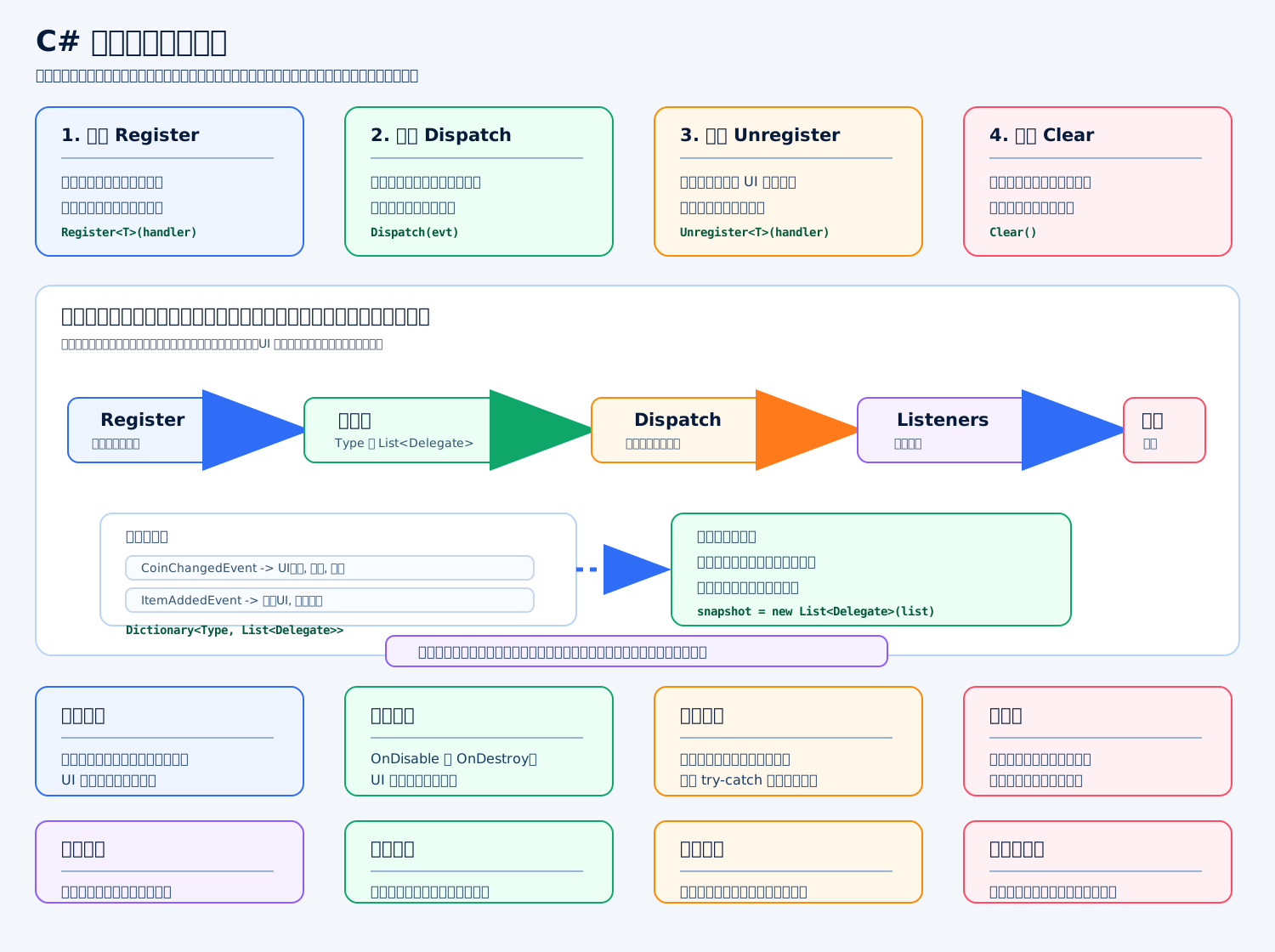
标准答案
事件系统的核心是:用一张订阅表保存“事件类型 → 监听函数列表”。注册时把函数加入列表,派发时根据事件类型找到监听者并逐个调用,注销时把函数移除。
我更推荐用泛型事件类型,而不是字符串事件名,因为泛型更安全,不容易拼错。
C# 事件系统
c
using System; // 引入 Action 和 Type
using System.Collections.Generic; // 引入 Dictionary 和 List

public sealed class EventBus // 定义事件总线类
{ // 类开始
    private readonly Dictionary<Type, List<Delegate>> listeners = new Dictionary<Type, List<Delegate>>(); // 保存事件类型和监听函数列表
    public void Register<TEvent>(Action<TEvent> handler) // 注册某种事件的监听函数
    { // Register 开始
        if (handler == null) // 如果传入的监听函数为空
        { // 空判断开始
            return; // 直接返回
        } // 空判断结束
        Type eventType = typeof(TEvent); // 获取事件类型
        if (!listeners.TryGetValue(eventType, out List<Delegate> list)) // 如果这个事件类型还没有监听列表
        { // 判断开始
            list = new List<Delegate>(); // 创建新的监听列表
            listeners[eventType] = list; // 放入订阅表
        } // 判断结束
        if (list.Contains(handler)) // 如果已经注册过同一个监听函数
        { // 重复判断开始
            return; // 防止重复注册
        } // 重复判断结束
        list.Add(handler); // 添加监听函数
    } // Register 结束

    public void Unregister<TEvent>(Action<TEvent> handler) // 注销某种事件的监听函数
    { // Unregister 开始
        if (handler == null) // 如果传入的监听函数为空
        { // 空判断开始
            return; // 直接返回
        } // 空判断结束
        Type eventType = typeof(TEvent); // 获取事件类型
        if (!listeners.TryGetValue(eventType, out List<Delegate> list)) // 如果没有这个事件的监听列表
        { // 判断开始
            return; // 不需要注销
        } // 判断结束
        list.Remove(handler); // 从监听列表中移除函数
        if (list.Count == 0) // 如果这个事件已经没有监听者
        { // 空列表判断开始
            listeners.Remove(eventType); // 从订阅表中移除这个事件类型
        } // 空列表判断结束
    } // Unregister 结束

    public void Dispatch<TEvent>(TEvent eventData) // 派发某种事件
    { // Dispatch 开始
        Type eventType = typeof(TEvent); // 获取事件类型
        if (!listeners.TryGetValue(eventType, out List<Delegate> list)) // 如果没有监听者
        { // 判断开始
            return; // 直接返回
        } // 判断结束
        List<Delegate> snapshot = new List<Delegate>(list); // 复制一份快照,避免派发中注销导致遍历异常
        for (int i = 0; i < snapshot.Count; i++) // 按注册顺序遍历监听者
        { // for 开始
            Action<TEvent> handler = snapshot[i] as Action<TEvent>; // 把 Delegate 转回具体事件类型的 Action
            if (handler == null) // 如果类型转换失败
            { // 判断开始
                continue; // 跳过这个异常监听
            } // 判断结束
            try // 防止单个监听异常影响其他监听
            { // try 开始
                handler.Invoke(eventData); // 调用监听函数
            } // try 结束
            catch (Exception exception) // 捕获监听函数异常
            { // catch 开始
                UnityEngine.Debug.LogException(exception); // 在 Unity 控制台输出异常
            } // catch 结束
        } // for 结束
    } // Dispatch 结束

    public void Clear() // 清空所有事件监听
    { // Clear 开始
        listeners.Clear(); // 清空订阅表
    } // Clear 结束
} // 类结束使用示例
c
public struct CoinChangedEvent // 定义金币变化事件
{ // 事件结构开始
    public int coin; // 当前金币数量
} // 事件结构结束

EventBus eventBus = new EventBus(); // 创建事件系统
eventBus.Register<CoinChangedEvent>(OnCoinChanged); // 注册金币变化监听
eventBus.Dispatch(new CoinChangedEvent { coin = 100 }); // 派发金币变化事件
eventBus.Unregister<CoinChangedEvent>(OnCoinChanged); // 注销金币变化监听关键点
UI 窗口关闭、对象销毁时一定要注销事件,否则事件系统会持有对象引用,导致对象无法释放。
派发时复制一份监听列表,是为了防止某个监听函数在回调里注销自己,导致遍历原列表出错。
事件系统适合“通知事实”,比如金币变化、背包变化、任务完成;不要把复杂业务流程全塞进事件里,否则调用链会变得很难追踪。
写一个状态机,支持进入、更新、退出
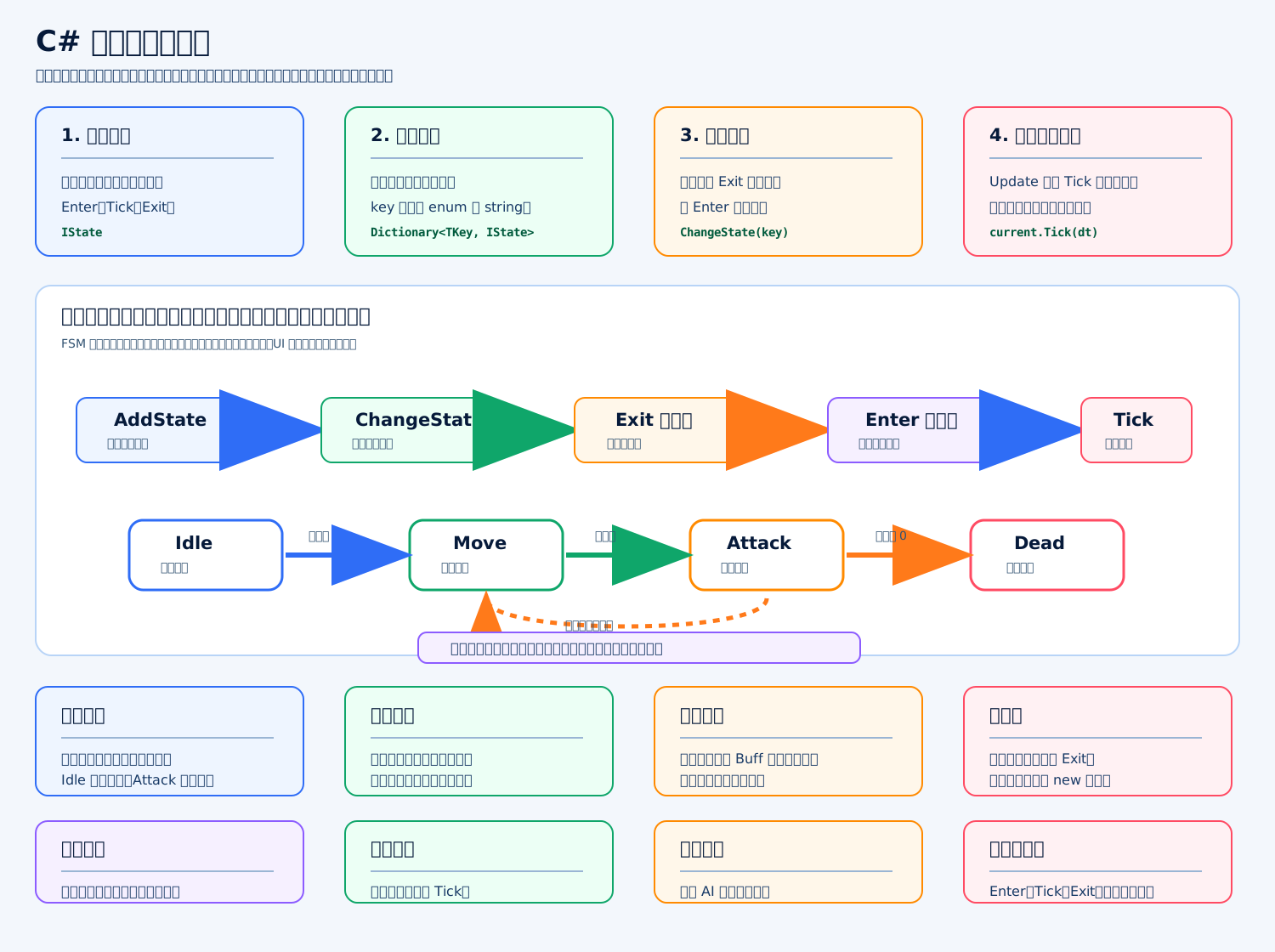
标准答案
状态机核心就是三个生命周期:
Enter:进入状态时初始化。 Tick:当前状态每帧更新。 Exit:离开状态时清理。
切换状态时顺序一定是:旧状态 Exit() → 新状态 Enter() → 后续每帧 Tick()。
C# 通用状态机
c
using System.Collections.Generic; // 引入 Dictionary 和 EqualityComparer

public interface IState // 定义状态接口
{ // 接口开始
    void Enter(); // 进入状态时调用
    void Tick(float deltaTime); // 状态每帧更新时调用
    void Exit(); // 退出状态时调用
} // 接口结束

public sealed class StateMachine<TKey> // 定义泛型状态机,TKey 可以是 enum 或 string
{ // 类开始
    private readonly Dictionary<TKey, IState> states = new Dictionary<TKey, IState>(); // 保存状态 key 和状态对象
    private IState currentState; // 当前正在运行的状态
    private TKey currentKey; // 当前状态对应的 key
    private bool hasCurrentState; // 是否已经有当前状态
    public TKey CurrentKey => currentKey; // 对外暴露当前状态 key
    public IState CurrentState => currentState; // 对外暴露当前状态对象

    public void AddState(TKey key, IState state) // 注册一个状态
    { // AddState 开始
        if (state == null) // 如果传入状态为空
        { // 空状态判断开始
            return; // 直接返回
        } // 空状态判断结束
        states[key] = state; // 添加或覆盖这个 key 对应的状态
    } // AddState 结束

    public bool ChangeState(TKey key) // 切换到指定状态
    { // ChangeState 开始
        if (!states.TryGetValue(key, out IState nextState)) // 如果找不到目标状态
        { // 查找失败判断开始
            return false; // 切换失败
        } // 查找失败判断结束
        if (hasCurrentState && EqualityComparer<TKey>.Default.Equals(currentKey, key)) // 如果目标状态就是当前状态
        { // 重复切换判断开始
            return true; // 不重复进入,直接认为成功
        } // 重复切换判断结束
        if (currentState != null) // 如果当前有旧状态
        { // 旧状态判断开始
            currentState.Exit(); // 先退出旧状态
        } // 旧状态判断结束
        currentKey = key; // 保存新的状态 key
        currentState = nextState; // 保存新的状态对象
        hasCurrentState = true; // 标记状态机已经有当前状态
        currentState.Enter(); // 进入新状态
        return true; // 切换成功
    } // ChangeState 结束

    public void Tick(float deltaTime) // 每帧更新状态机
    { // Tick 开始
        if (currentState == null) // 如果当前没有状态
        { // 空状态判断开始
            return; // 不执行更新
        } // 空状态判断结束
        currentState.Tick(deltaTime); // 只更新当前状态
    } // Tick 结束

    public void Stop() // 停止状态机
    { // Stop 开始
        if (currentState != null) // 如果当前有状态
        { // 当前状态判断开始
            currentState.Exit(); // 退出当前状态
        } // 当前状态判断结束
        currentState = null; // 清空当前状态对象
        currentKey = default; // 清空当前状态 key
        hasCurrentState = false; // 标记没有当前状态
    } // Stop 结束
} // 类结束Unity 使用方式
在 Update() 里调用:
c
stateMachine.Tick(Time.deltaTime); // 每帧更新当前状态角色、怪物、技能、UI 流程都可以用这个结构。关键是状态职责要清楚:移动状态只管移动,攻击状态只管攻击,退出攻击状态时要关闭攻击判定盒、清理计时器或动画参数。
写一个计时器管理器,支持延迟和循环
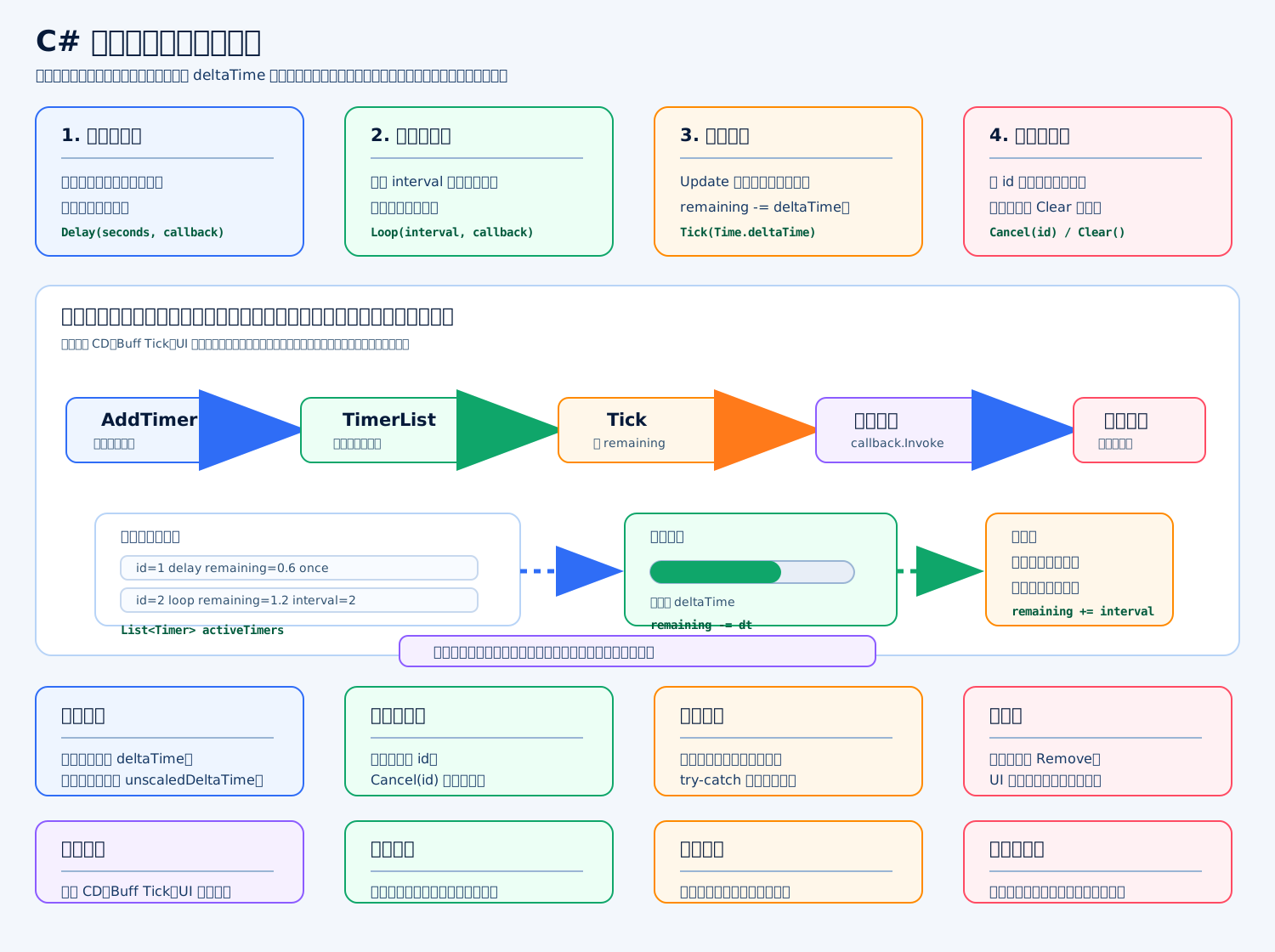
标准答案
计时器管理器的核心就是:统一保存计时任务,每帧用 deltaTime 扣时间,到点后执行回调;延迟计时器执行一次后移除,循环计时器执行后重置剩余时间。
在 Unity 里它常用于:技能 CD、Buff Tick、UI 倒计时、延迟关闭窗口、循环刷新任务等。重点不是只会写 Invoke,而是要能处理:取消计时器、回调异常、遍历中新增/删除、暂停时间和非暂停时间。
C# 实现
c
using System; // 引入 Action 和 Exception
using System.Collections.Generic; // 引入 List
using UnityEngine; // 引入 MonoBehaviour、Time、Debug、Mathf

public sealed class TimerManager : MonoBehaviour // 定义 Unity 计时器管理器
{ // TimerManager 类开始
    private sealed class Timer // 定义单个计时任务
    { // Timer 类开始
        public int id; // 计时器唯一 ID
        public float remaining; // 距离下一次触发还剩多少秒
        public float interval; // 循环计时器的间隔时间
        public bool loop; // 是否循环执行
        public bool useUnscaledTime; // 是否使用不受 timeScale 影响的时间
        public bool cancelled; // 是否已经被取消
        public Action callback; // 到时间后执行的回调
    } // Timer 类结束

    private readonly List<Timer> timers = new List<Timer>(); // 当前正在运行的计时器列表
    private readonly List<Timer> pendingAdd = new List<Timer>(); // Tick 过程中新增的计时器暂存列表
    private int nextId = 1; // 下一个计时器 ID
    private bool ticking; // 当前是否正在遍历计时器

    public int Delay(float seconds, Action callback, bool useUnscaledTime = false) // 添加延迟计时器
    { // Delay 方法开始
        return AddTimer(seconds, false, callback, useUnscaledTime); // 创建只执行一次的计时器
    } // Delay 方法结束

    public int Loop(float interval, Action callback, bool useUnscaledTime = false) // 添加循环计时器
    { // Loop 方法开始
        return AddTimer(interval, true, callback, useUnscaledTime); // 创建循环执行的计时器
    } // Loop 方法结束

    private int AddTimer(float seconds, bool loop, Action callback, bool useUnscaledTime) // 创建计时器
    { // AddTimer 方法开始
        if (callback == null) // 如果回调为空
        { // 空回调判断开始
            return -1; // 返回无效 ID
        } // 空回调判断结束

        Timer timer = new Timer(); // 创建计时器对象
        timer.id = nextId++; // 分配唯一 ID
        timer.remaining = Mathf.Max(0f, seconds); // 设置第一次触发前的剩余时间
        timer.interval = Mathf.Max(0.0001f, seconds); // 设置循环间隔,避免 0 秒死循环
        timer.loop = loop; // 保存是否循环
        timer.useUnscaledTime = useUnscaledTime; // 保存时间源类型
        timer.callback = callback; // 保存回调函数

        if (ticking) // 如果当前正在 Tick 遍历
        { // Tick 中新增分支开始
            pendingAdd.Add(timer); // 先放进待添加列表
        } // Tick 中新增分支结束
        else // 如果当前没有遍历
        { // 直接添加分支开始
            timers.Add(timer); // 直接加入运行列表
        } // 直接添加分支结束

        return timer.id; // 返回计时器 ID,方便之后取消
    } // AddTimer 方法结束

    public bool Cancel(int id) // 取消指定计时器
    { // Cancel 方法开始
        bool found = false; // 记录是否找到目标计时器

        for (int i = 0; i < timers.Count; i++) // 遍历运行列表
        { // for 开始
            if (timers[i].id == id) // 如果 ID 匹配
            { // ID 判断开始
                timers[i].cancelled = true; // 标记为取消
                found = true; // 标记找到了
            } // ID 判断结束
        } // for 结束

        for (int i = 0; i < pendingAdd.Count; i++) // 遍历待添加列表
        { // for 开始
            if (pendingAdd[i].id == id) // 如果 ID 匹配
            { // ID 判断开始
                pendingAdd[i].cancelled = true; // 标记为取消
                found = true; // 标记找到了
            } // ID 判断结束
        } // for 结束

        return found; // 返回是否取消成功
    } // Cancel 方法结束

    public void Clear() // 清空所有计时器
    { // Clear 方法开始
        timers.Clear(); // 清空运行列表
        pendingAdd.Clear(); // 清空待添加列表
    } // Clear 方法结束

    private void Update() // Unity 每帧调用
    { // Update 方法开始
        Tick(Time.deltaTime, Time.unscaledDeltaTime); // 推进所有计时器
    } // Update 方法结束

    private void Tick(float deltaTime, float unscaledDeltaTime) // 计时器核心更新逻辑
    { // Tick 方法开始
        ticking = true; // 标记正在遍历

        for (int i = timers.Count - 1; i >= 0; i--) // 倒序遍历,方便安全删除
        { // for 开始
            Timer timer = timers[i]; // 取出当前计时器
            if (timer.cancelled) // 如果已经被取消
            { // 取消判断开始
                timers.RemoveAt(i); // 从运行列表移除
                continue; // 跳过当前计时器
            } // 取消判断结束

            float dt = timer.useUnscaledTime ? unscaledDeltaTime : deltaTime; // 根据类型选择时间源
            timer.remaining -= dt; // 扣除经过的时间

            if (timer.remaining > 0f) // 如果还没到触发时间
            { // 时间判断开始
                continue; // 等下一帧继续扣时间
            } // 时间判断结束

            InvokeTimer(timer); // 执行回调

            if (timer.cancelled) // 如果回调里取消了自己
            { // 回调取消判断开始
                timers.RemoveAt(i); // 移除计时器
            } // 回调取消判断结束
            else if (timer.loop) // 如果是循环计时器
            { // 循环分支开始
                timer.remaining += timer.interval; // 重置下一次触发时间
            } // 循环分支结束
            else // 如果是单次计时器
            { // 单次分支开始
                timers.RemoveAt(i); // 触发后移除
            } // 单次分支结束
        } // for 结束

        ticking = false; // 标记遍历结束
        FlushPendingAdd(); // 合并 Tick 中新增的计时器
    } // Tick 方法结束

    private void InvokeTimer(Timer timer) // 安全执行计时器回调
    { // InvokeTimer 方法开始
        try // 尝试执行回调
        { // try 开始
            timer.callback.Invoke(); // 调用回调
        } // try 结束
        catch (Exception exception) // 捕获回调异常
        { // catch 开始
            Debug.LogException(exception); // 打印异常,避免一个计时器影响全部计时器
        } // catch 结束
    } // InvokeTimer 方法结束

    private void FlushPendingAdd() // 合并待添加计时器
    { // FlushPendingAdd 方法开始
        for (int i = 0; i < pendingAdd.Count; i++) // 遍历待添加列表
        { // for 开始
            if (!pendingAdd[i].cancelled) // 如果没有被取消
            { // 取消判断开始
                timers.Add(pendingAdd[i]); // 加入运行列表
            } // 取消判断结束
        } // for 结束

        pendingAdd.Clear(); // 清空待添加列表
    } // FlushPendingAdd 方法结束
} // TimerManager 类结束关键点
这个版本比简单 Invoke 更适合项目:能拿到 id 取消任务,能区分 deltaTime 和 unscaledDeltaTime,回调异常不会中断整个管理器,遍历中新增计时器也不会破坏列表。
面试里可以补一句:如果计时器数量非常大,可以用最小堆或时间轮优化;普通技能 CD、UI 倒计时、Buff Tick 用 List 就足够清晰。
写一个 JSON 存档管理器
标准答案
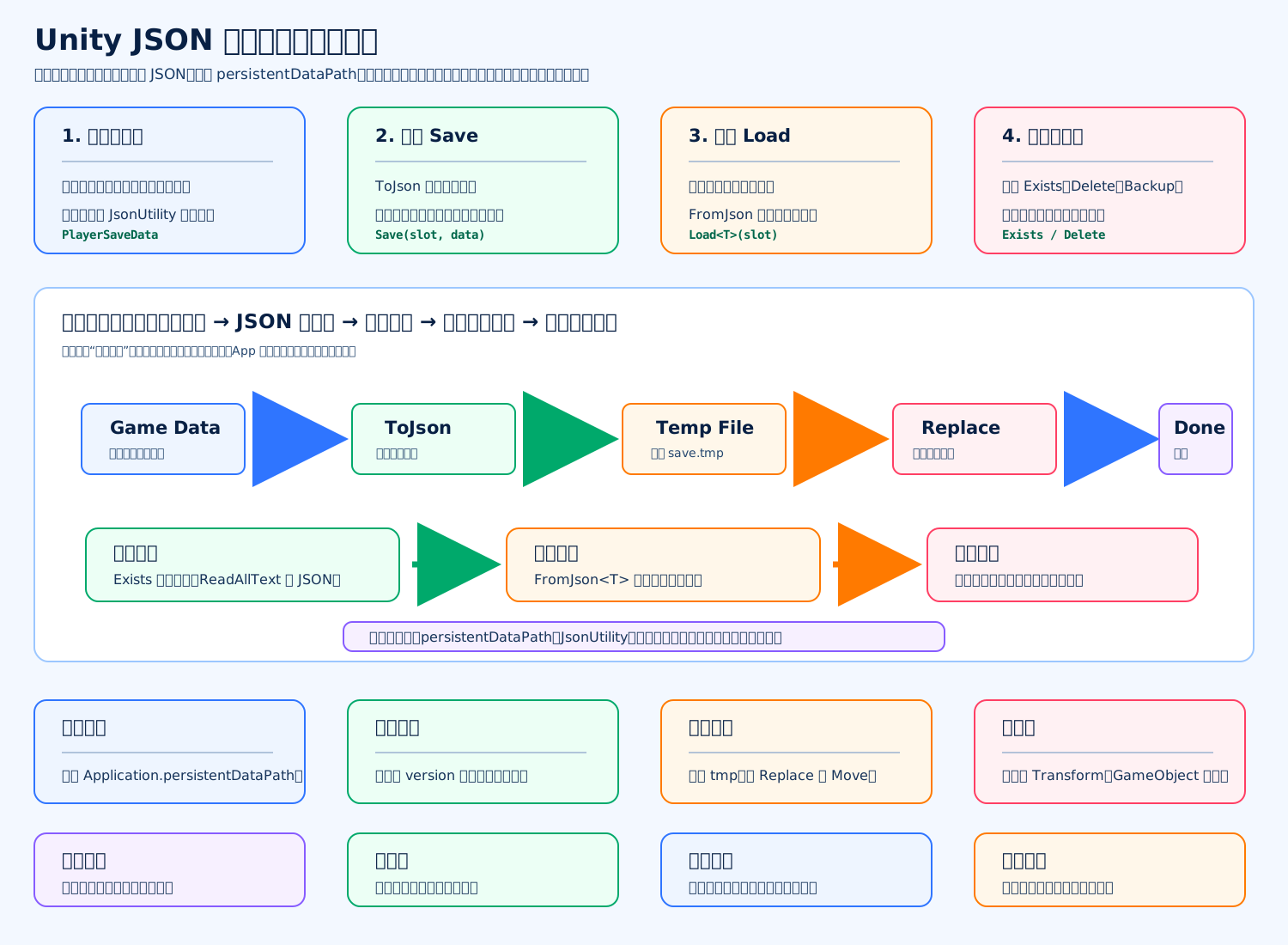
JSON 存档管理器的核心是:把游戏运行时的纯数据对象序列化成 JSON,写到 Application.persistentDataPath;读取时再反序列化回来。项目里要重点处理路径、异常、备份、删除、版本兼容,不能只写一个 File.WriteAllText 就完事。
c
using System; // 引入 Serializable 和 Exception
using System.Collections.Generic; // 引入 List
using System.IO; // 引入 File、Directory、Path
using UnityEngine; // 引入 Application、JsonUtility、Debug

public static class JsonSaveManager // 定义 JSON 存档管理器
{ // JsonSaveManager 类开始
    private static string SaveFolder => Path.Combine(Application.persistentDataPath, "Save"); // 获取存档目录

    public static bool Save<T>(string slotName, T data, bool prettyPrint = true) where T : class // 保存存档数据
    { // Save 方法开始
        if (data == null) // 判断数据是否为空
        { // 空数据判断开始
            Debug.LogError("Save failed: data is null."); // 输出错误日志
            return false; // 返回保存失败
        } // 空数据判断结束

        string path = GetSavePath(slotName); // 获取正式存档路径
        string tempPath = path + ".tmp"; // 获取临时文件路径
        string backupPath = path + ".bak"; // 获取备份文件路径

        try // 尝试保存
        { // try 开始
            Directory.CreateDirectory(SaveFolder); // 确保存档目录存在
            string json = JsonUtility.ToJson(data, prettyPrint); // 把对象序列化成 JSON 字符串
            File.WriteAllText(tempPath, json); // 先写入临时文件,避免写一半损坏正式存档

            if (File.Exists(path)) // 如果正式存档已经存在
            { // 正式存档存在判断开始
                File.Copy(path, backupPath, true); // 先复制一份备份文件
                File.Delete(path); // 删除旧的正式存档
            } // 正式存档存在判断结束

            File.Move(tempPath, path); // 把临时文件改成正式存档
            return true; // 返回保存成功
        } // try 结束
        catch (Exception exception) // 捕获保存异常
        { // catch 开始
            Debug.LogError($"Save failed: {exception.Message}"); // 输出错误信息

            if (File.Exists(tempPath)) // 如果临时文件还存在
            { // 临时文件判断开始
                File.Delete(tempPath); // 删除残留临时文件
            } // 临时文件判断结束

            return false; // 返回保存失败
        } // catch 结束
    } // Save 方法结束

    public static T Load<T>(string slotName, T defaultValue = null) where T : class // 读取存档数据
    { // Load 方法开始
        string path = GetSavePath(slotName); // 获取正式存档路径

        if (!File.Exists(path)) // 如果正式存档不存在
        { // 存档不存在判断开始
            return LoadBackup(slotName, defaultValue); // 尝试读取备份存档
        } // 存档不存在判断结束

        try // 尝试读取
        { // try 开始
            string json = File.ReadAllText(path); // 读取 JSON 文本
            T data = JsonUtility.FromJson<T>(json); // 把 JSON 反序列化成对象
            return data ?? defaultValue; // 如果读取结果为空,就返回默认值
        } // try 结束
        catch (Exception exception) // 捕获读取异常
        { // catch 开始
            Debug.LogWarning($"Load failed, try backup: {exception.Message}"); // 输出警告日志
            return LoadBackup(slotName, defaultValue); // 正式存档坏了就尝试读备份
        } // catch 结束
    } // Load 方法结束

    private static T LoadBackup<T>(string slotName, T defaultValue) where T : class // 读取备份存档
    { // LoadBackup 方法开始
        string backupPath = GetSavePath(slotName) + ".bak"; // 获取备份文件路径

        if (!File.Exists(backupPath)) // 如果备份文件不存在
        { // 备份不存在判断开始
            return defaultValue; // 返回默认数据
        } // 备份不存在判断结束

        try // 尝试读取备份
        { // try 开始
            string json = File.ReadAllText(backupPath); // 读取备份 JSON 文本
            T data = JsonUtility.FromJson<T>(json); // 反序列化备份数据
            return data ?? defaultValue; // 如果备份数据为空,就返回默认值
        } // try 结束
        catch (Exception exception) // 捕获备份读取异常
        { // catch 开始
            Debug.LogError($"Load backup failed: {exception.Message}"); // 输出错误日志
            return defaultValue; // 返回默认数据
        } // catch 结束
    } // LoadBackup 方法结束

    public static bool Exists(string slotName) // 判断存档是否存在
    { // Exists 方法开始
        return File.Exists(GetSavePath(slotName)); // 返回正式存档文件是否存在
    } // Exists 方法结束

    public static bool Delete(string slotName) // 删除存档
    { // Delete 方法开始
        try // 尝试删除
        { // try 开始
            DeleteFile(GetSavePath(slotName)); // 删除正式存档
            DeleteFile(GetSavePath(slotName) + ".tmp"); // 删除临时文件
            DeleteFile(GetSavePath(slotName) + ".bak"); // 删除备份文件
            return true; // 返回删除成功
        } // try 结束
        catch (Exception exception) // 捕获删除异常
        { // catch 开始
            Debug.LogError($"Delete failed: {exception.Message}"); // 输出错误日志
            return false; // 返回删除失败
        } // catch 结束
    } // Delete 方法结束

    private static void DeleteFile(string path) // 删除单个文件
    { // DeleteFile 方法开始
        if (File.Exists(path)) // 如果文件存在
        { // 文件存在判断开始
            File.Delete(path); // 删除文件
        } // 文件存在判断结束
    } // DeleteFile 方法结束

    private static string GetSavePath(string slotName) // 获取存档完整路径
    { // GetSavePath 方法开始
        string safeName = MakeSafeFileName(slotName); // 清理非法文件名字符
        return Path.Combine(SaveFolder, safeName + ".json"); // 拼接最终 JSON 文件路径
    } // GetSavePath 方法结束

    private static string MakeSafeFileName(string slotName) // 生成安全文件名
    { // MakeSafeFileName 方法开始
        slotName = string.IsNullOrWhiteSpace(slotName) ? "default" : slotName; // 如果槽位名为空,就使用 default

        foreach (char invalidChar in Path.GetInvalidFileNameChars()) // 遍历系统不允许的文件名字符
        { // foreach 开始
            slotName = slotName.Replace(invalidChar, '_'); // 把非法字符替换成下划线
        } // foreach 结束

        return slotName; // 返回安全槽位名
    } // MakeSafeFileName 方法结束
} // JsonSaveManager 类结束

[Serializable] // 让 Unity JsonUtility 可以序列化这个类
public class PlayerSaveData // 定义玩家存档数据
{ // PlayerSaveData 类开始
    public int version = 1; // 存档版本号,方便后续兼容升级
    public int level = 1; // 玩家等级
    public int gold = 0; // 玩家金币
    public List<string> items = new List<string>(); // 玩家道具 ID 列表
} // PlayerSaveData 类结束使用方式
c
PlayerSaveData data = new PlayerSaveData(); // 创建玩家存档数据
data.level = 10; // 设置玩家等级
data.gold = 999; // 设置玩家金币
data.items.Add("sword_001"); // 添加一个道具 ID
JsonSaveManager.Save("player_01", data); // 保存到 player_01.json
PlayerSaveData loaded = JsonSaveManager.Load("player_01", new PlayerSaveData()); // 读取存档,失败时返回默认数据
JsonSaveManager.Delete("player_01"); // 删除这个存档槽位面试关键点
JsonUtility 适合轻量本地存档,但它不支持字典直接序列化,也不适合保存 GameObject、Transform 这类运行时对象引用。重要数值不能只信客户端,本地 JSON 最多做单机进度、设置、缓存;如果是联网游戏,核心资产和战斗结果要以服务端为准。
写一个配置表读取器
标准答案
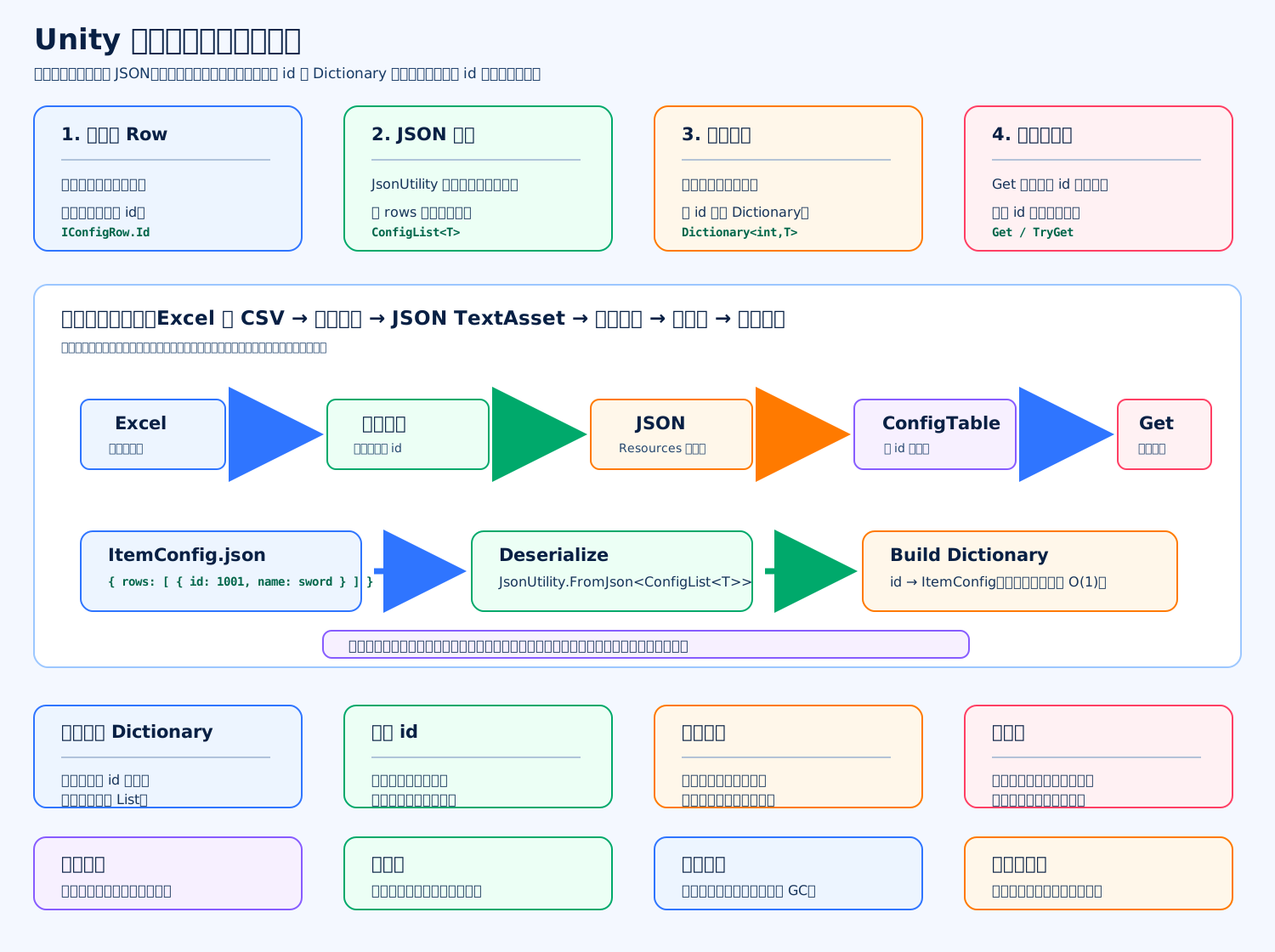
配置表读取器的核心是:把策划表导出的 JSON 反序列化成强类型配置对象,然后按 id 建 Dictionary<int, T> 索引。这样业务代码查配置时不用遍历表,也不用关心 JSON、CSV、Excel 这些文件格式。
下面这个版本适合 Unity 面试手写:支持泛型配置表、Get、TryGet、重复 id 检查、读取失败兜底。
c
using System; // 引入 Serializable
using System.Collections.Generic; // 引入 List 和 Dictionary
using UnityEngine; // 引入 MonoBehaviour、Resources、TextAsset、Debug

public interface IConfigRow // 定义配置表行接口
{ // 接口开始
    int Id { get; } // 每行配置必须提供唯一 id
} // 接口结束

[Serializable] // 让 Unity JsonUtility 可以序列化这个包装类
public sealed class ConfigList<T> // 定义 JSON 根节点包装类
{ // ConfigList 类开始
    public List<T> rows = new List<T>(); // 保存配置表所有行数据
} // ConfigList 类结束

public sealed class ConfigTable<T> where T : IConfigRow // 定义泛型配置表
{ // ConfigTable 类开始
    private readonly Dictionary<int, T> map = new Dictionary<int, T>(); // 用 id 建立快速查询索引
    private readonly List<T> rows = new List<T>(); // 保存所有配置行,方便遍历

    public IReadOnlyList<T> Rows => rows; // 对外只读暴露所有行
    public int Count => rows.Count; // 对外暴露配置行数量

    public void Build(List<T> sourceRows) // 根据反序列化结果建立索引
    { // Build 方法开始
        map.Clear(); // 清空旧索引
        rows.Clear(); // 清空旧行数据

        if (sourceRows == null) // 如果传入数据为空
        { // 空数据判断开始
            return; // 直接结束
        } // 空数据判断结束

        for (int i = 0; i < sourceRows.Count; i++) // 遍历所有配置行
        { // for 开始
            T row = sourceRows[i]; // 取出当前行

            if (row == null) // 如果当前行为空
            { // 空行判断开始
                Debug.LogError($"Config row is null at index {i}."); // 打印错误日志
                continue; // 跳过当前行
            } // 空行判断结束

            if (map.ContainsKey(row.Id)) // 如果 id 重复
            { // 重复 id 判断开始
                Debug.LogError($"Duplicate config id: {row.Id}."); // 打印重复 id 错误
                continue; // 跳过重复行
            } // 重复 id 判断结束

            map.Add(row.Id, row); // 把配置行加入字典索引
            rows.Add(row); // 把配置行加入列表
        } // for 结束
    } // Build 方法结束

    public bool TryGet(int id, out T row) // 尝试按 id 获取配置
    { // TryGet 方法开始
        return map.TryGetValue(id, out row); // 返回是否找到配置
    } // TryGet 方法结束

    public T Get(int id) // 按 id 获取配置
    { // Get 方法开始
        if (map.TryGetValue(id, out T row)) // 如果能找到配置
        { // 找到配置判断开始
            return row; // 返回配置行
        } // 找到配置判断结束

        Debug.LogError($"Config id not found: {id}."); // 找不到时打印错误
        return default; // 返回默认值
    } // Get 方法结束

    public bool Contains(int id) // 判断配置是否存在
    { // Contains 方法开始
        return map.ContainsKey(id); // 返回字典里是否存在这个 id
    } // Contains 方法结束
} // ConfigTable 类结束

public static class ConfigReader // 定义配置表读取器
{ // ConfigReader 类开始
    public static ConfigTable<T> LoadFromResources<T>(string resourcePath) where T : IConfigRow // 从 Resources 加载配置
    { // LoadFromResources 方法开始
        TextAsset asset = Resources.Load<TextAsset>(resourcePath); // 加载 JSON 文本资源

        if (asset == null) // 如果资源不存在
        { // 资源不存在判断开始
            Debug.LogError($"Config file not found: {resourcePath}."); // 打印错误日志
            return new ConfigTable<T>(); // 返回空表,避免业务空引用
        } // 资源不存在判断结束

        return LoadFromJson<T>(asset.text, resourcePath); // 从 JSON 字符串加载配置表
    } // LoadFromResources 方法结束

    public static ConfigTable<T> LoadFromJson<T>(string json, string sourceName = "unknown") where T : IConfigRow // 从 JSON 字符串加载配置
    { // LoadFromJson 方法开始
        ConfigTable<T> table = new ConfigTable<T>(); // 创建配置表对象

        if (string.IsNullOrWhiteSpace(json)) // 如果 JSON 内容为空
        { // 空 JSON 判断开始
            Debug.LogError($"Config json is empty: {sourceName}."); // 打印错误日志
            return table; // 返回空表
        } // 空 JSON 判断结束

        try // 尝试解析 JSON
        { // try 开始
            ConfigList<T> list = JsonUtility.FromJson<ConfigList<T>>(json); // 反序列化 JSON 包装对象
            table.Build(list?.rows); // 根据 rows 建立字典索引
            return table; // 返回配置表
        } // try 结束
        catch (Exception exception) // 捕获解析异常
        { // catch 开始
            Debug.LogError($"Load config failed: {sourceName}, {exception.Message}."); // 打印解析失败原因
            return table; // 返回空表
        } // catch 结束
    } // LoadFromJson 方法结束
} // ConfigReader 类结束

[Serializable] // 让 Unity JsonUtility 可以序列化这个配置类
public sealed class ItemConfig : IConfigRow // 定义一个道具配置行
{ // ItemConfig 类开始
    public int id; // 道具 id
    public string name; // 道具名称
    public int price; // 道具价格
    public string icon; // 道具图标资源名
    public int Id => id; // 实现 IConfigRow 的 Id 属性
} // ItemConfig 类结束

public sealed class ConfigReaderExample : MonoBehaviour // 定义配置读取示例脚本
{ // 示例类开始
    private ConfigTable<ItemConfig> itemTable; // 保存道具配置表

    private void Awake() // Unity 初始化时调用
    { // Awake 方法开始
        itemTable = ConfigReader.LoadFromResources<ItemConfig>("Configs/ItemConfig"); // 从 Resources/Configs/ItemConfig.json 加载配置
    } // Awake 方法结束

    private void Start() // 第一帧 Update 前调用
    { // Start 方法开始
        ItemConfig sword = itemTable.Get(1001); // 查询 id 为 1001 的道具配置

        if (sword != null) // 如果配置存在
        { // 配置存在判断开始
            Debug.Log($"Item name: {sword.name}, price: {sword.price}."); // 打印配置内容
        } // 配置存在判断结束
    } // Start 方法结束
} // 示例类结束JSON 示例
c
{
  "rows": [
    {
      "id": 1001,
      "name": "铁剑",
      "price": 100,
      "icon": "icon_sword"
    }
  ]
}面试关键点
配置表读取器最好做到“强类型 + 索引 + 校验”。业务层只写 itemTable.Get(1001),不要到处解析 JSON 或硬编码数值。项目里通常是 Excel 导出 JSON、二进制或 ScriptableObject,运行时只负责加载和查询;热更新项目里配置表也可以跟资源包一起更新。
写一个 LRU Cache
标准答案
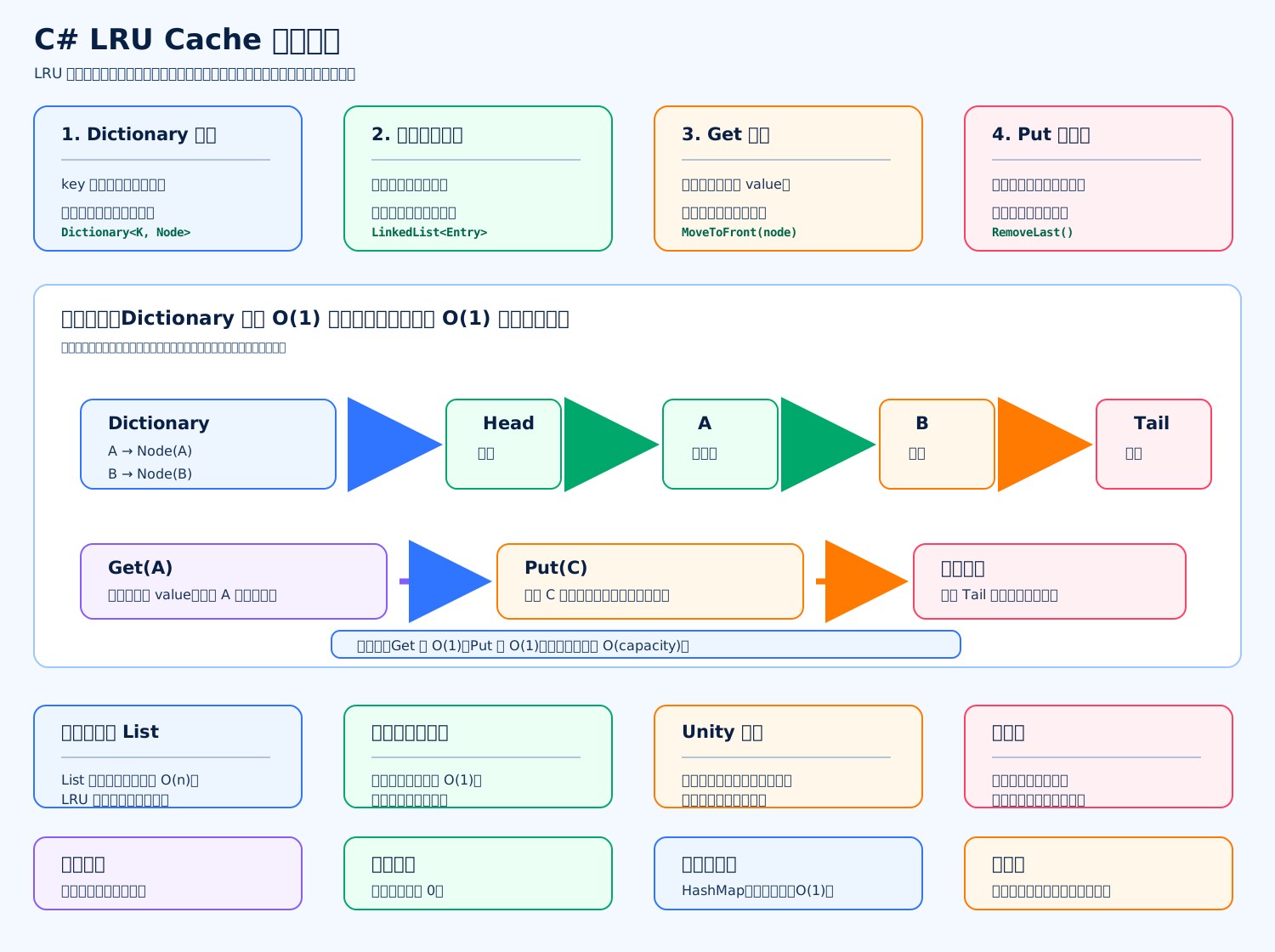
LRU Cache 是“最近最少使用缓存”。核心规则是:访问过的数据变成“最新”,缓存满了以后淘汰“最久没被访问”的数据。手写时最标准的结构是 Dictionary + 双向链表,这样 Get 和 Put 都能做到接近 O(1)。
c
using System; // 引入异常类型
using System.Collections.Generic; // 引入 Dictionary 和 LinkedList

public sealed class LruCache<TKey, TValue> // 定义泛型 LRU 缓存
{ // LruCache 类开始
    private sealed class Entry // 定义缓存节点里保存的数据
    { // Entry 类开始
        public TKey Key; // 保存缓存 key
        public TValue Value; // 保存缓存 value

        public Entry(TKey key, TValue value) // 定义 Entry 构造函数
        { // Entry 构造函数开始
            Key = key; // 保存 key
            Value = value; // 保存 value
        } // Entry 构造函数结束
    } // Entry 类结束

    private readonly int capacity; // 缓存最大容量
    private readonly Dictionary<TKey, LinkedListNode<Entry>> map; // key 到链表节点的映射
    private readonly LinkedList<Entry> list; // 双向链表,头部最新,尾部最旧

    public int Count => map.Count; // 当前缓存数量
    public int Capacity => capacity; // 当前缓存容量

    public LruCache(int capacity) // 定义构造函数
    { // 构造函数开始
        if (capacity <= 0) // 如果容量不合法
        { // 容量判断开始
            throw new ArgumentOutOfRangeException(nameof(capacity)); // 抛出容量异常
        } // 容量判断结束

        this.capacity = capacity; // 保存最大容量
        map = new Dictionary<TKey, LinkedListNode<Entry>>(capacity); // 创建字典索引
        list = new LinkedList<Entry>(); // 创建双向链表
    } // 构造函数结束

    public bool TryGet(TKey key, out TValue value) // 尝试读取缓存
    { // TryGet 方法开始
        if (map.TryGetValue(key, out LinkedListNode<Entry> node)) // 如果字典里能找到节点
        { // 命中判断开始
            MoveToFront(node); // 命中后移动到链表头部
            value = node.Value.Value; // 取出节点里的 value
            return true; // 返回命中成功
        } // 命中判断结束

        value = default(TValue); // 未命中时返回默认值
        return false; // 返回命中失败
    } // TryGet 方法结束

    public TValue Get(TKey key) // 读取缓存,找不到就抛异常
    { // Get 方法开始
        if (TryGet(key, out TValue value)) // 如果读取成功
        { // 读取成功判断开始
            return value; // 返回缓存值
        } // 读取成功判断结束

        throw new KeyNotFoundException($"Key not found: {key}"); // 找不到时抛出异常
    } // Get 方法结束

    public void Put(TKey key, TValue value) // 写入或更新缓存
    { // Put 方法开始
        if (map.TryGetValue(key, out LinkedListNode<Entry> node)) // 如果 key 已经存在
        { // 已存在判断开始
            node.Value.Value = value; // 更新旧 value
            MoveToFront(node); // 更新后移动到头部
            return; // 结束写入逻辑
        } // 已存在判断结束

        if (map.Count >= capacity) // 如果缓存已经满了
        { // 满容量判断开始
            RemoveLeastRecentlyUsed(); // 删除最久未使用的节点
        } // 满容量判断结束

        Entry entry = new Entry(key, value); // 创建新的缓存数据
        LinkedListNode<Entry> newNode = new LinkedListNode<Entry>(entry); // 创建新的链表节点
        list.AddFirst(newNode); // 新节点放到头部,表示最新使用
        map.Add(key, newNode); // 字典记录 key 到节点的映射
    } // Put 方法结束

    public bool Remove(TKey key) // 删除指定缓存
    { // Remove 方法开始
        if (!map.TryGetValue(key, out LinkedListNode<Entry> node)) // 如果 key 不存在
        { // 不存在判断开始
            return false; // 删除失败
        } // 不存在判断结束

        list.Remove(node); // 从链表中删除节点
        map.Remove(key); // 从字典中删除索引
        return true; // 删除成功
    } // Remove 方法结束

    public bool ContainsKey(TKey key) // 判断 key 是否存在
    { // ContainsKey 方法开始
        return map.ContainsKey(key); // 返回字典是否包含 key
    } // ContainsKey 方法结束

    public void Clear() // 清空缓存
    { // Clear 方法开始
        list.Clear(); // 清空链表
        map.Clear(); // 清空字典
    } // Clear 方法结束

    private void MoveToFront(LinkedListNode<Entry> node) // 把节点移动到头部
    { // MoveToFront 方法开始
        if (node == list.First) // 如果节点已经在头部
        { // 头部判断开始
            return; // 不需要移动
        } // 头部判断结束

        list.Remove(node); // 先从当前位置移除
        list.AddFirst(node); // 再插入到链表头部
    } // MoveToFront 方法结束

    private void RemoveLeastRecentlyUsed() // 删除最久未使用的数据
    { // RemoveLeastRecentlyUsed 方法开始
        LinkedListNode<Entry> lastNode = list.Last; // 获取链表尾部节点

        if (lastNode == null) // 如果链表为空
        { // 空链表判断开始
            return; // 直接返回
        } // 空链表判断结束

        list.RemoveLast(); // 删除链表尾部节点
        map.Remove(lastNode.Value.Key); // 删除字典中对应的 key
    } // RemoveLeastRecentlyUsed 方法结束
} // LruCache 类结束使用示例
c
LruCache<int, string> cache = new LruCache<int, string>(2); // 创建容量为 2 的 LRU 缓存
cache.Put(1, "A"); // 放入 1
cache.Put(2, "B"); // 放入 2
cache.TryGet(1, out string value); // 访问 1,让 1 变成最新
cache.Put(3, "C"); // 放入 3,容量满了会淘汰最旧的 2
bool hasTwo = cache.ContainsKey(2); // 此时 2 已经被淘汰,结果是 false复杂度
Get:O(1),因为字典直接定位节点。 Put:O(1),因为链表头插入、尾删除都是常数级。 空间复杂度:O(capacity)。
Unity 项目里可以用它缓存头像、图标、配置查询结果、文本解析结果。如果缓存的是 Texture、AssetBundle、Addressables 句柄,淘汰时还要补一个释放回调,否则可能只是从缓存移除了引用,但资源生命周期没有真正处理。
写一个优先队列
标准答案
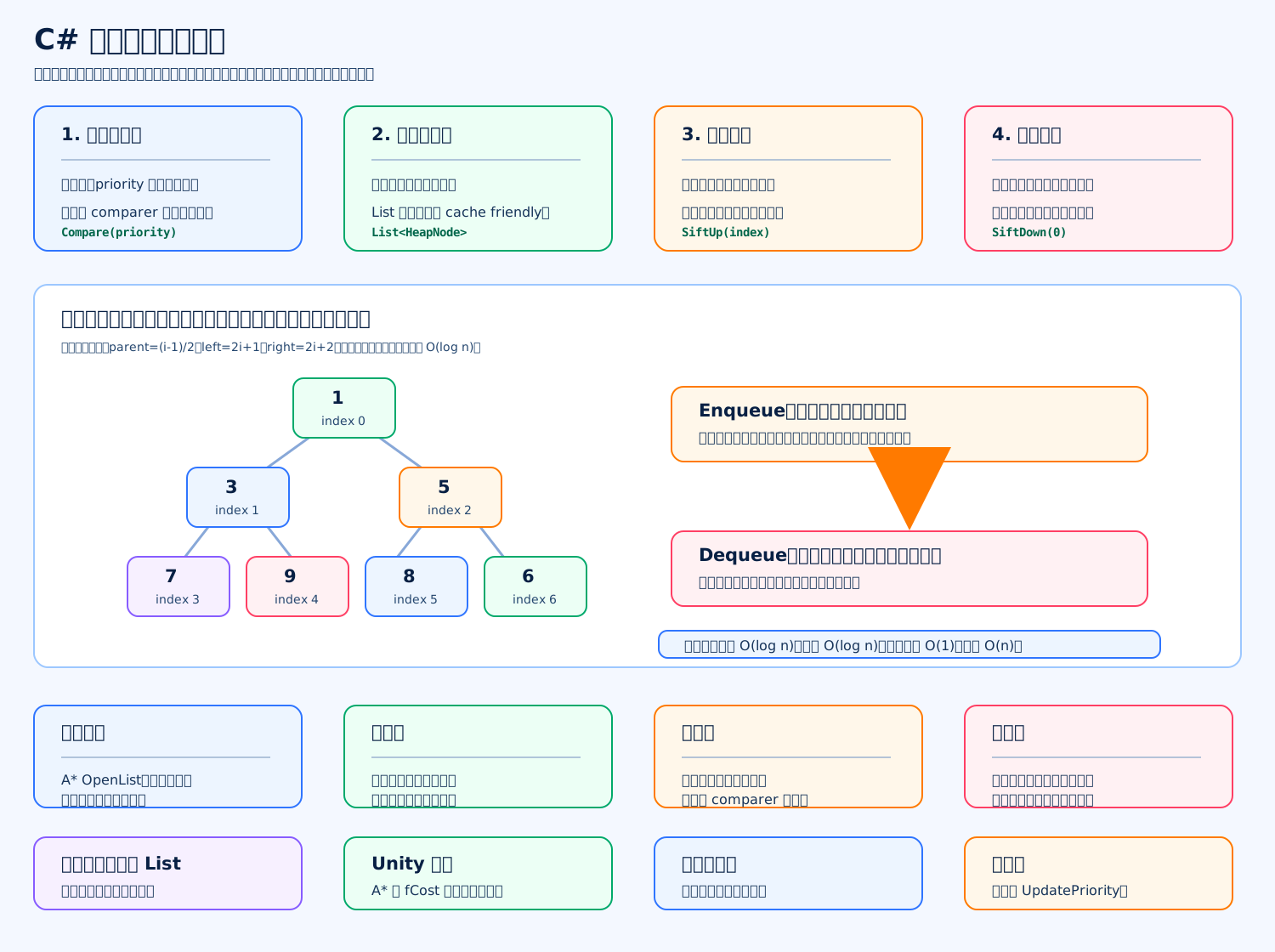
优先队列的核心是:不是谁先进谁先出,而是谁优先级最高谁先出。面试手写最常见实现是“二叉堆”,默认可以写成小根堆:priority 越小,越先出队。
c
using System; // 引入 InvalidOperationException
using System.Collections.Generic; // 引入 List 和 IComparer

public sealed class PriorityQueue<TValue, TPriority> // 定义泛型优先队列
{ // PriorityQueue 类开始
    private struct HeapNode // 定义堆里的节点
    { // HeapNode 结构体开始
        public TValue Value; // 保存真正的数据
        public TPriority Priority; // 保存数据对应的优先级

        public HeapNode(TValue value, TPriority priority) // 定义节点构造函数
        { // 构造函数开始
            Value = value; // 保存数据
            Priority = priority; // 保存优先级
        } // 构造函数结束
    } // HeapNode 结构体结束

    private readonly List<HeapNode> heap; // 用 List 存储二叉堆
    private readonly IComparer<TPriority> comparer; // 用 comparer 比较优先级

    public int Count => heap.Count; // 返回当前队列元素数量
    public bool IsEmpty => heap.Count == 0; // 返回队列是否为空

    public PriorityQueue(IComparer<TPriority> comparer = null) // 定义构造函数
    { // 构造函数开始
        heap = new List<HeapNode>(); // 创建堆数组
        this.comparer = comparer ?? Comparer<TPriority>.Default; // 如果没传 comparer,就使用默认比较器
    } // 构造函数结束

    public void Enqueue(TValue value, TPriority priority) // 入队一个元素
    { // Enqueue 方法开始
        HeapNode node = new HeapNode(value, priority); // 创建新节点
        heap.Add(node); // 先把新节点放到数组末尾
        SiftUp(heap.Count - 1); // 从末尾开始上浮,恢复堆性质
    } // Enqueue 方法结束

    public TValue Dequeue() // 出队优先级最高的元素
    { // Dequeue 方法开始
        if (heap.Count == 0) // 如果堆为空
        { // 空堆判断开始
            throw new InvalidOperationException("PriorityQueue is empty."); // 抛出空队列异常
        } // 空堆判断结束

        TValue result = heap[0].Value; // 堆顶就是当前优先级最高的元素
        int lastIndex = heap.Count - 1; // 获取最后一个元素下标
        heap[0] = heap[lastIndex]; // 用最后一个元素补到堆顶
        heap.RemoveAt(lastIndex); // 删除最后一个元素

        if (heap.Count > 0) // 如果堆里还有元素
        { // 非空判断开始
            SiftDown(0); // 从堆顶开始下沉,恢复堆性质
        } // 非空判断结束

        return result; // 返回出队元素
    } // Dequeue 方法结束

    public bool TryDequeue(out TValue value) // 尝试出队
    { // TryDequeue 方法开始
        if (heap.Count == 0) // 如果队列为空
        { // 空队列判断开始
            value = default(TValue); // 输出默认值
            return false; // 返回出队失败
        } // 空队列判断结束

        value = Dequeue(); // 调用 Dequeue 获取元素
        return true; // 返回出队成功
    } // TryDequeue 方法结束

    public TValue Peek() // 查看堆顶元素但不删除
    { // Peek 方法开始
        if (heap.Count == 0) // 如果队列为空
        { // 空队列判断开始
            throw new InvalidOperationException("PriorityQueue is empty."); // 抛出空队列异常
        } // 空队列判断结束

        return heap[0].Value; // 返回堆顶元素
    } // Peek 方法结束

    public void Clear() // 清空优先队列
    { // Clear 方法开始
        heap.Clear(); // 清空堆数组
    } // Clear 方法结束

    private void SiftUp(int index) // 上浮操作
    { // SiftUp 方法开始
        while (index > 0) // 只要当前节点不是根节点
        { // while 开始
            int parent = (index - 1) / 2; // 根据数组下标计算父节点下标

            if (!HasHigherPriority(index, parent)) // 如果当前节点优先级不高于父节点
            { // 判断开始
                break; // 堆性质已经正确,结束上浮
            } // 判断结束

            Swap(index, parent); // 交换当前节点和父节点
            index = parent; // 继续检查新的父节点位置
        } // while 结束
    } // SiftUp 方法结束

    private void SiftDown(int index) // 下沉操作
    { // SiftDown 方法开始
        while (true) // 不断向下调整
        { // while 开始
            int left = index * 2 + 1; // 计算左孩子下标
            int right = index * 2 + 2; // 计算右孩子下标
            int best = index; // 假设当前节点优先级最高

            if (left < heap.Count && HasHigherPriority(left, best)) // 如果左孩子存在且优先级更高
            { // 左孩子判断开始
                best = left; // 更新最佳节点为左孩子
            } // 左孩子判断结束

            if (right < heap.Count && HasHigherPriority(right, best)) // 如果右孩子存在且优先级更高
            { // 右孩子判断开始
                best = right; // 更新最佳节点为右孩子
            } // 右孩子判断结束

            if (best == index) // 如果当前节点已经比两个孩子都优先
            { // 结束判断开始
                break; // 堆性质已经恢复
            } // 结束判断结束

            Swap(index, best); // 交换当前节点和更优的孩子
            index = best; // 继续向下检查
        } // while 结束
    } // SiftDown 方法结束

    private bool HasHigherPriority(int a, int b) // 判断 a 是否比 b 优先级更高
    { // HasHigherPriority 方法开始
        return comparer.Compare(heap[a].Priority, heap[b].Priority) < 0; // 小根堆:priority 更小表示更优先
    } // HasHigherPriority 方法结束

    private void Swap(int a, int b) // 交换两个堆节点
    { // Swap 方法开始
        HeapNode temp = heap[a]; // 暂存 a 节点
        heap[a] = heap[b]; // 把 b 放到 a
        heap[b] = temp; // 把原来的 a 放到 b
    } // Swap 方法结束
} // PriorityQueue 类结束使用示例
c
PriorityQueue<string, int> queue = new PriorityQueue<string, int>(); // 创建小根堆优先队列
queue.Enqueue("普通任务", 10); // 加入普通任务
queue.Enqueue("紧急任务", 1); // 加入紧急任务
queue.Enqueue("中等任务", 5); // 加入中等任务
string first = queue.Dequeue(); // 取出紧急任务,因为 1 最小复杂度
Enqueue:O(log n),新节点可能一路上浮。 Dequeue:O(log n),堆顶移除后需要下沉。 Peek:O(1),直接看数组第 0 个。 空间复杂度:O(n)。
Unity 里常见用途是 A* 寻路的 OpenList,每次取 fCost 最小的节点;也可以用于任务调度、按时间触发的计时器、技能优先级选择。
写一个红点树
标准答案
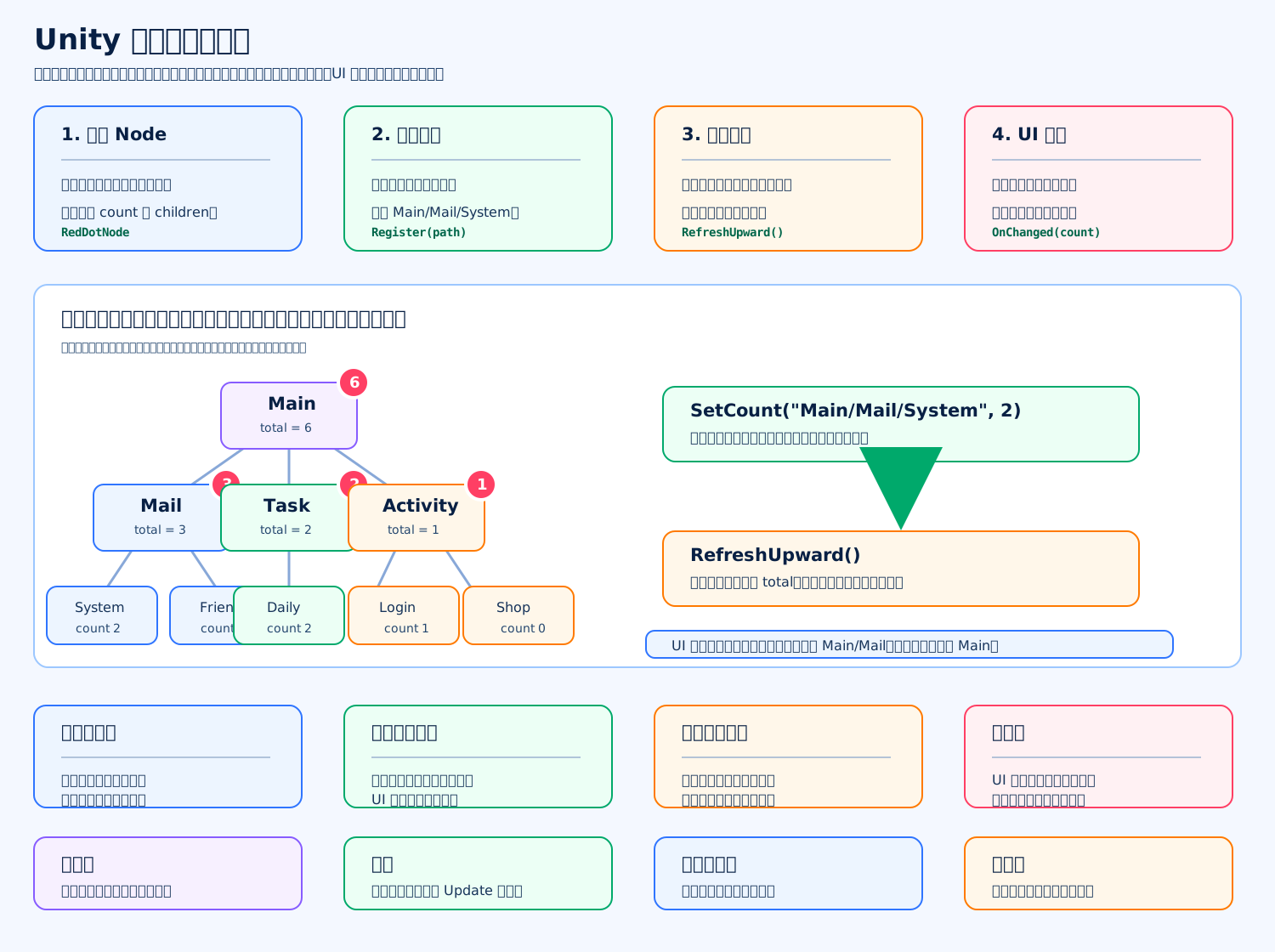
红点树的核心是:叶子节点记录真实红点数量,父节点不手动维护,而是自动汇总所有子节点数量。比如 Main/Mail/System 有 2 个未读,Main/Mail/Friend 有 1 个未读,那么 Main/Mail 自动显示 3,Main 也会自动加上这 3。
c
using System; // 引入 Action
using System.Collections.Generic; // 引入 Dictionary
using UnityEngine; // 引入 Mathf 和 Debug

public sealed class RedDotNode // 定义红点树节点
{ // RedDotNode 类开始
    public string Name { get; private set; } // 当前节点名字
    public string Path { get; private set; } // 当前节点完整路径
    public int SelfCount { get; private set; } // 当前节点自己的红点数量
    public int TotalCount { get; private set; } // 当前节点自己加所有子节点的总红点数量
    public RedDotNode Parent { get; private set; } // 当前节点的父节点
    private readonly Dictionary<string, RedDotNode> children = new Dictionary<string, RedDotNode>(); // 子节点字典
    public event Action<int> Changed; // 红点数量变化事件

    public RedDotNode(string name, string path, RedDotNode parent) // 定义节点构造函数
    { // 构造函数开始
        Name = name; // 保存节点名字
        Path = path; // 保存节点路径
        Parent = parent; // 保存父节点
    } // 构造函数结束

    public RedDotNode GetOrAddChild(string name) // 获取或创建子节点
    { // GetOrAddChild 方法开始
        if (children.TryGetValue(name, out RedDotNode child)) // 如果子节点已经存在
        { // 已存在判断开始
            return child; // 返回已有子节点
        } // 已存在判断结束

        string childPath = string.IsNullOrEmpty(Path) ? name : Path + "/" + name; // 拼出子节点完整路径
        child = new RedDotNode(name, childPath, this); // 创建新的子节点
        children.Add(name, child); // 把子节点加入字典
        return child; // 返回新子节点
    } // GetOrAddChild 方法结束

    public bool TryGetChild(string name, out RedDotNode child) // 尝试获取子节点
    { // TryGetChild 方法开始
        return children.TryGetValue(name, out child); // 返回是否找到子节点
    } // TryGetChild 方法结束

    public void SetSelfCount(int count) // 设置当前节点自己的红点数量
    { // SetSelfCount 方法开始
        count = Mathf.Max(0, count); // 红点数量不能小于 0

        if (SelfCount == count) // 如果数量没有变化
        { // 数量相同判断开始
            return; // 直接返回,避免重复通知
        } // 数量相同判断结束

        SelfCount = count; // 更新自己的红点数量
        RefreshUpward(); // 从当前节点开始向上刷新
    } // SetSelfCount 方法结束

    private void RefreshUpward() // 向上刷新红点数量
    { // RefreshUpward 方法开始
        int oldTotal = TotalCount; // 记录旧的总数量
        TotalCount = CalculateTotalCount(); // 重新计算当前节点总数量

        if (oldTotal != TotalCount) // 如果总数量发生变化
        { // 变化判断开始
            Changed?.Invoke(TotalCount); // 通知监听当前节点的 UI
            Parent?.RefreshUpward(); // 继续通知父节点刷新
        } // 变化判断结束
    } // RefreshUpward 方法结束

    private int CalculateTotalCount() // 计算当前节点总红点数量
    { // CalculateTotalCount 方法开始
        int total = SelfCount; // 先加当前节点自己的数量

        foreach (RedDotNode child in children.Values) // 遍历所有子节点
        { // foreach 开始
            total += child.TotalCount; // 加上子节点总数量
        } // foreach 结束

        return total; // 返回汇总数量
    } // CalculateTotalCount 方法结束

    public void AddListener(Action<int> listener) // 添加红点变化监听
    { // AddListener 方法开始
        Changed += listener; // 注册监听回调
        listener?.Invoke(TotalCount); // 立刻同步一次当前数量
    } // AddListener 方法结束

    public void RemoveListener(Action<int> listener) // 移除红点变化监听
    { // RemoveListener 方法开始
        Changed -= listener; // 注销监听回调
    } // RemoveListener 方法结束
} // RedDotNode 类结束

public sealed class RedDotTree // 定义红点树管理器
{ // RedDotTree 类开始
    private readonly RedDotNode root; // 红点树根节点

    public RedDotTree(string rootName = "Main") // 定义构造函数
    { // 构造函数开始
        root = new RedDotNode(rootName, rootName, null); // 创建根节点
    } // 构造函数结束

    public RedDotNode Root => root; // 暴露根节点

    public RedDotNode Register(string path) // 注册红点路径
    { // Register 方法开始
        return GetOrCreateNode(path); // 获取或创建路径节点
    } // Register 方法结束

    public void SetCount(string path, int count) // 设置某个路径的红点数量
    { // SetCount 方法开始
        RedDotNode node = GetOrCreateNode(path); // 获取或创建目标节点
        node.SetSelfCount(count); // 设置目标节点自己的数量
    } // SetCount 方法结束

    public int GetCount(string path) // 获取某个路径的总红点数量
    { // GetCount 方法开始
        RedDotNode node = FindNode(path); // 查找目标节点
        return node == null ? 0 : node.TotalCount; // 找不到返回 0,找到返回总数量
    } // GetCount 方法结束

    public void AddListener(string path, Action<int> listener) // 给某个路径添加监听
    { // AddListener 方法开始
        RedDotNode node = GetOrCreateNode(path); // 获取或创建目标节点
        node.AddListener(listener); // 添加监听
    } // AddListener 方法结束

    public void RemoveListener(string path, Action<int> listener) // 移除某个路径的监听
    { // RemoveListener 方法开始
        RedDotNode node = FindNode(path); // 查找目标节点

        if (node == null) // 如果节点不存在
        { // 空节点判断开始
            return; // 直接返回
        } // 空节点判断结束

        node.RemoveListener(listener); // 移除监听
    } // RemoveListener 方法结束

    private RedDotNode GetOrCreateNode(string path) // 获取或创建路径节点
    { // GetOrCreateNode 方法开始
        RedDotNode current = root; // 从根节点开始
        string[] names = SplitPath(path); // 拆分路径

        for (int i = 0; i < names.Length; i++) // 遍历路径中的每一段
        { // for 开始
            current = current.GetOrAddChild(names[i]); // 逐层创建或获取子节点
        } // for 结束

        return current; // 返回最终节点
    } // GetOrCreateNode 方法结束

    private RedDotNode FindNode(string path) // 查找路径节点
    { // FindNode 方法开始
        RedDotNode current = root; // 从根节点开始
        string[] names = SplitPath(path); // 拆分路径

        for (int i = 0; i < names.Length; i++) // 遍历路径中的每一段
        { // for 开始
            if (!current.TryGetChild(names[i], out current)) // 如果某一层找不到
            { // 找不到判断开始
                return null; // 返回空
            } // 找不到判断结束
        } // for 结束

        return current; // 返回找到的节点
    } // FindNode 方法结束

    private string[] SplitPath(string path) // 拆分红点路径
    { // SplitPath 方法开始
        if (string.IsNullOrWhiteSpace(path)) // 如果路径为空
        { // 空路径判断开始
            return Array.Empty<string>(); // 返回空数组,表示根节点
        } // 空路径判断结束

        return path.Split(new[] { '/' }, StringSplitOptions.RemoveEmptyEntries); // 按斜杠拆分路径并移除空段
    } // SplitPath 方法结束
} // RedDotTree 类结束

public sealed class RedDotExample : MonoBehaviour // 定义 Unity 使用示例
{ // RedDotExample 类开始
    private RedDotTree redDotTree; // 保存红点树

    private void Awake() // Unity 初始化时调用
    { // Awake 方法开始
        redDotTree = new RedDotTree("Main"); // 创建红点树
        redDotTree.Register("Mail/System"); // 注册系统邮件红点路径
        redDotTree.Register("Mail/Friend"); // 注册好友邮件红点路径
        redDotTree.Register("Task/Daily"); // 注册每日任务红点路径
        redDotTree.AddListener("Mail", OnMailRedDotChanged); // 邮件按钮监听 Mail 节点
        redDotTree.AddListener("Main", OnMainRedDotChanged); // 主界面入口监听 Main 节点
    } // Awake 方法结束

    private void Start() // 第一帧 Update 前调用
    { // Start 方法开始
        redDotTree.SetCount("Mail/System", 2); // 设置系统邮件未读数量
        redDotTree.SetCount("Mail/Friend", 1); // 设置好友邮件未读数量
        redDotTree.SetCount("Task/Daily", 3); // 设置每日任务可领取数量
    } // Start 方法结束

    private void OnDestroy() // 对象销毁时调用
    { // OnDestroy 方法开始
        redDotTree.RemoveListener("Mail", OnMailRedDotChanged); // 移除邮件按钮监听
        redDotTree.RemoveListener("Main", OnMainRedDotChanged); // 移除主界面入口监听
    } // OnDestroy 方法结束

    private void OnMailRedDotChanged(int count) // 邮件红点变化回调
    { // OnMailRedDotChanged 方法开始
        Debug.Log($"Mail red dot count: {count}"); // 刷新邮件按钮红点显示
    } // OnMailRedDotChanged 方法结束

    private void OnMainRedDotChanged(int count) // 主入口红点变化回调
    { // OnMainRedDotChanged 方法开始
        Debug.Log($"Main red dot count: {count}"); // 刷新主入口红点显示
    } // OnMainRedDotChanged 方法结束
} // RedDotExample 类结束面试关键点
红点树比“每个按钮自己算红点”更稳定,因为它把红点关系集中管理了。叶子节点变化时,只刷新从叶子到根节点这一条路径,不需要全量刷新所有 UI,也不需要在 Update 里轮询。
常见坑是:UI 关闭时忘记取消监听、路径字符串拼错、同一个路径重复注册出多个节点。项目里通常会把路径做成常量或配置表,减少硬编码。
写一个技能 CD 系统
标准答案
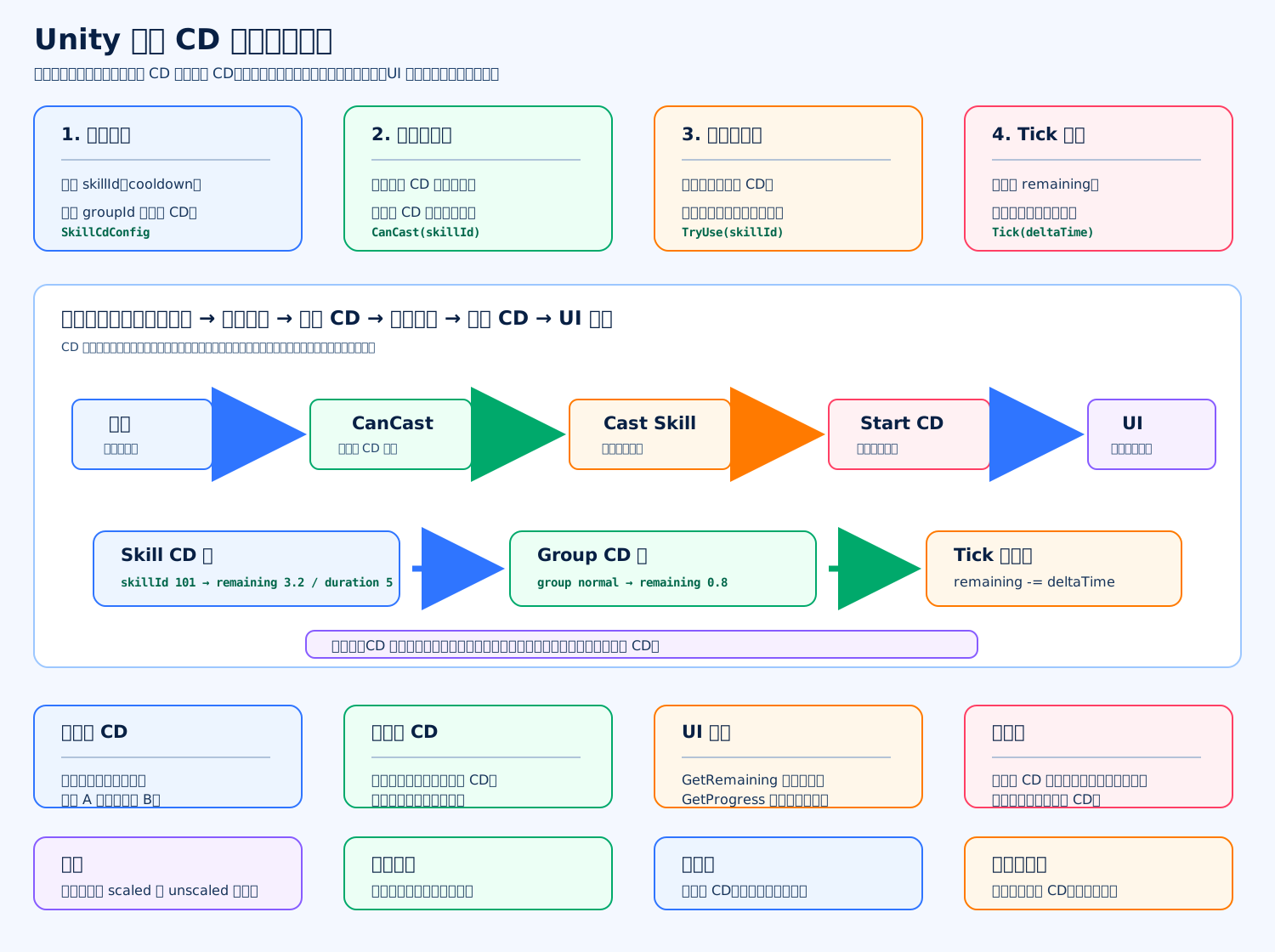
技能 CD 系统的核心是:技能释放前先检查“单技能 CD”和“公共组 CD”,释放成功后才启动倒计时;每帧用 deltaTime 扣剩余时间,UI 只负责读取剩余时间和进度,不直接改 CD。
c
using System; // 引入 Serializable
using System.Collections.Generic; // 引入 Dictionary、List、IEnumerable
using UnityEngine; // 引入 Mathf 和 MonoBehaviour

public enum SkillCastBlockReason // 定义技能释放失败原因
{ // 枚举开始
    None, // 没有阻塞,可以释放
    UnknownSkill, // 技能没有配置
    SkillCooldown, // 技能自身还在 CD
    GroupCooldown // 公共组 CD 还没结束
} // 枚举结束

[Serializable] // 让 Unity 可以序列化这个配置类
public sealed class SkillCdConfig // 定义技能 CD 配置
{ // SkillCdConfig 类开始
    public int SkillId; // 技能 ID
    public float Cooldown; // 技能自身 CD 秒数
    public string GroupId; // 公共 CD 组 ID
    public float GroupCooldown; // 公共 CD 秒数
} // SkillCdConfig 类结束

public sealed class SkillCooldownSystem // 定义技能 CD 系统
{ // SkillCooldownSystem 类开始
    private readonly Dictionary<int, SkillCdConfig> configs = new Dictionary<int, SkillCdConfig>(); // 保存技能配置
    private readonly Dictionary<int, float> skillRemaining = new Dictionary<int, float>(); // 保存技能自身剩余 CD
    private readonly Dictionary<string, float> groupRemaining = new Dictionary<string, float>(); // 保存公共组剩余 CD
    private readonly List<int> skillKeyBuffer = new List<int>(); // 缓存技能 key,避免遍历时修改字典
    private readonly List<string> groupKeyBuffer = new List<string>(); // 缓存组 key,避免遍历时修改字典

    public SkillCooldownSystem(IEnumerable<SkillCdConfig> skillConfigs) // 定义构造函数
    { // 构造函数开始
        foreach (SkillCdConfig config in skillConfigs) // 遍历传入的配置
        { // foreach 开始
            Register(config); // 注册单个技能配置
        } // foreach 结束
    } // 构造函数结束

    public void Register(SkillCdConfig config) // 注册或覆盖技能配置
    { // Register 方法开始
        if (config == null) // 如果配置为空
        { // 空配置判断开始
            return; // 直接返回
        } // 空配置判断结束

        configs[config.SkillId] = config; // 按技能 ID 保存配置
    } // Register 方法结束

    public bool CanCast(int skillId) // 判断技能是否可以释放
    { // CanCast 方法开始
        return GetBlockReason(skillId) == SkillCastBlockReason.None; // 没有阻塞原因就可以释放
    } // CanCast 方法结束

    public SkillCastBlockReason GetBlockReason(int skillId) // 获取技能释放阻塞原因
    { // GetBlockReason 方法开始
        if (!configs.TryGetValue(skillId, out SkillCdConfig config)) // 如果没有找到技能配置
        { // 配置不存在判断开始
            return SkillCastBlockReason.UnknownSkill; // 返回未知技能
        } // 配置不存在判断结束

        if (GetSkillRemaining(skillId) > 0f) // 如果技能自身 CD 还没结束
        { // 技能 CD 判断开始
            return SkillCastBlockReason.SkillCooldown; // 返回技能自身 CD 阻塞
        } // 技能 CD 判断结束

        if (!string.IsNullOrEmpty(config.GroupId) && GetGroupRemaining(config.GroupId) > 0f) // 如果公共组 CD 还没结束
        { // 公共 CD 判断开始
            return SkillCastBlockReason.GroupCooldown; // 返回公共组 CD 阻塞
        } // 公共 CD 判断结束

        return SkillCastBlockReason.None; // 返回没有阻塞
    } // GetBlockReason 方法结束

    public bool TryUse(int skillId) // 尝试释放技能并启动 CD
    { // TryUse 方法开始
        if (!CanCast(skillId)) // 如果技能当前不能释放
        { // 不能释放判断开始
            return false; // 返回释放失败
        } // 不能释放判断结束

        StartCooldown(skillId); // 释放成功后启动 CD
        return true; // 返回释放成功
    } // TryUse 方法结束

    public void StartCooldown(int skillId) // 启动技能 CD
    { // StartCooldown 方法开始
        if (!configs.TryGetValue(skillId, out SkillCdConfig config)) // 如果技能没有配置
        { // 配置不存在判断开始
            return; // 直接返回
        } // 配置不存在判断结束

        if (config.Cooldown > 0f) // 如果技能自身 CD 大于 0
        { // 技能 CD 判断开始
            skillRemaining[skillId] = config.Cooldown; // 设置技能自身剩余 CD
        } // 技能 CD 判断结束

        if (!string.IsNullOrEmpty(config.GroupId) && config.GroupCooldown > 0f) // 如果配置了公共组 CD
        { // 公共 CD 判断开始
            groupRemaining[config.GroupId] = config.GroupCooldown; // 设置公共组剩余 CD
        } // 公共 CD 判断结束
    } // StartCooldown 方法结束

    public void Tick(float deltaTime) // 每帧推进 CD
    { // Tick 方法开始
        if (deltaTime <= 0f) // 如果时间没有推进
        { // 时间判断开始
            return; // 直接返回
        } // 时间判断结束

        TickSkillCooldowns(deltaTime); // 推进所有技能自身 CD
        TickGroupCooldowns(deltaTime); // 推进所有公共组 CD
    } // Tick 方法结束

    private void TickSkillCooldowns(float deltaTime) // 推进技能自身 CD
    { // TickSkillCooldowns 方法开始
        skillKeyBuffer.Clear(); // 清空技能 key 缓存

        foreach (int skillId in skillRemaining.Keys) // 遍历当前所有技能 CD 的 key
        { // foreach 开始
            skillKeyBuffer.Add(skillId); // 缓存 key,避免遍历时直接修改字典
        } // foreach 结束

        for (int i = 0; i < skillKeyBuffer.Count; i++) // 遍历缓存的技能 key
        { // for 开始
            int skillId = skillKeyBuffer[i]; // 取出技能 ID
            float remaining = skillRemaining[skillId] - deltaTime; // 扣除经过的时间

            if (remaining <= 0f) // 如果 CD 已经结束
            { // CD 结束判断开始
                skillRemaining.Remove(skillId); // 移除这个技能 CD
            } // CD 结束判断结束
            else // 如果 CD 还没结束
            { // CD 未结束分支开始
                skillRemaining[skillId] = remaining; // 更新剩余 CD
            } // CD 未结束分支结束
        } // for 结束
    } // TickSkillCooldowns 方法结束

    private void TickGroupCooldowns(float deltaTime) // 推进公共组 CD
    { // TickGroupCooldowns 方法开始
        groupKeyBuffer.Clear(); // 清空公共组 key 缓存

        foreach (string groupId in groupRemaining.Keys) // 遍历当前所有公共组 CD 的 key
        { // foreach 开始
            groupKeyBuffer.Add(groupId); // 缓存 key,避免遍历时直接修改字典
        } // foreach 结束

        for (int i = 0; i < groupKeyBuffer.Count; i++) // 遍历缓存的公共组 key
        { // for 开始
            string groupId = groupKeyBuffer[i]; // 取出公共组 ID
            float remaining = groupRemaining[groupId] - deltaTime; // 扣除经过的时间

            if (remaining <= 0f) // 如果公共组 CD 已经结束
            { // CD 结束判断开始
                groupRemaining.Remove(groupId); // 移除这个公共组 CD
            } // CD 结束判断结束
            else // 如果公共组 CD 还没结束
            { // CD 未结束分支开始
                groupRemaining[groupId] = remaining; // 更新公共组剩余 CD
            } // CD 未结束分支结束
        } // for 结束
    } // TickGroupCooldowns 方法结束

    public float GetSkillRemaining(int skillId) // 获取技能自身剩余 CD
    { // GetSkillRemaining 方法开始
        return skillRemaining.TryGetValue(skillId, out float value) ? Mathf.Max(0f, value) : 0f; // 返回剩余时间
    } // GetSkillRemaining 方法结束

    public float GetGroupRemaining(string groupId) // 获取公共组剩余 CD
    { // GetGroupRemaining 方法开始
        return groupRemaining.TryGetValue(groupId, out float value) ? Mathf.Max(0f, value) : 0f; // 返回剩余时间
    } // GetGroupRemaining 方法结束

    public float GetProgress(int skillId) // 获取技能 CD 进度
    { // GetProgress 方法开始
        if (!configs.TryGetValue(skillId, out SkillCdConfig config)) // 如果技能没有配置
        { // 配置不存在判断开始
            return 0f; // 返回无进度
        } // 配置不存在判断结束

        if (config.Cooldown <= 0f) // 如果技能没有 CD
        { // 无 CD 判断开始
            return 0f; // 返回无进度
        } // 无 CD 判断结束

        return Mathf.Clamp01(GetSkillRemaining(skillId) / config.Cooldown); // 返回 0 到 1 的剩余比例
    } // GetProgress 方法结束

    public void ReduceCooldown(int skillId, float seconds) // 减少指定技能 CD
    { // ReduceCooldown 方法开始
        if (!skillRemaining.ContainsKey(skillId)) // 如果技能当前不在 CD
        { // 不在 CD 判断开始
            return; // 直接返回
        } // 不在 CD 判断结束

        float remaining = skillRemaining[skillId] - Mathf.Max(0f, seconds); // 计算减少后的剩余时间

        if (remaining <= 0f) // 如果减少后 CD 结束
        { // CD 结束判断开始
            skillRemaining.Remove(skillId); // 移除技能 CD
        } // CD 结束判断结束
        else // 如果减少后仍然在 CD
        { // CD 未结束分支开始
            skillRemaining[skillId] = remaining; // 更新剩余 CD
        } // CD 未结束分支结束
    } // ReduceCooldown 方法结束

    public void ResetCooldown(int skillId) // 重置指定技能 CD
    { // ResetCooldown 方法开始
        skillRemaining.Remove(skillId); // 直接移除技能自身 CD
    } // ResetCooldown 方法结束

    public void Clear() // 清空所有 CD
    { // Clear 方法开始
        skillRemaining.Clear(); // 清空技能自身 CD
        groupRemaining.Clear(); // 清空公共组 CD
    } // Clear 方法结束
} // SkillCooldownSystem 类结束使用示例
c
List<SkillCdConfig> configs = new List<SkillCdConfig>(); // 创建技能 CD 配置列表
configs.Add(new SkillCdConfig { SkillId = 101, Cooldown = 5f, GroupId = "normal", GroupCooldown = 0.5f }); // 添加技能 101 配置
SkillCooldownSystem cdSystem = new SkillCooldownSystem(configs); // 创建技能 CD 系统
bool success = cdSystem.TryUse(101); // 尝试释放技能 101
cdSystem.Tick(Time.deltaTime); // 每帧推进 CD
float remain = cdSystem.GetSkillRemaining(101); // 获取技能剩余 CD
float progress = cdSystem.GetProgress(101); // 获取 UI 遮罩显示比例面试关键点
CD 系统最好只负责“时间状态”,不要把动画、扣蓝、伤害结算都塞进来。释放成功后才进入 CD,这是很重要的边界;如果技能因为没蓝、目标丢失、前摇被打断而失败,要看设计决定是否进入 CD。
联网游戏里客户端 CD 只能做表现和输入限制,真正能不能释放要由服务端校验时间戳,否则玩家可以改客户端 CD。