
Appearance
变量
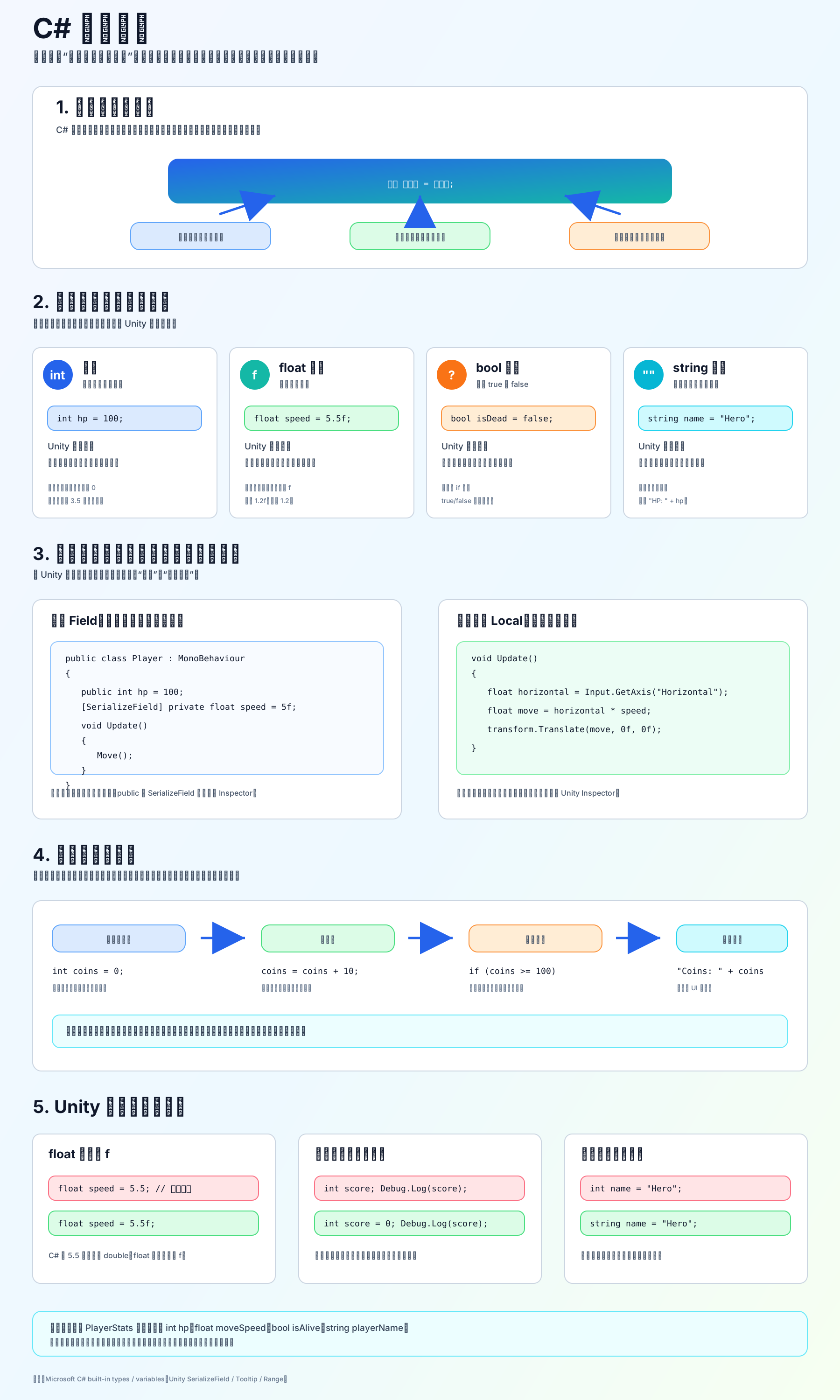
变量是什么
变量就是一个“有名字的数据盒子”。
基本格式:
c
类型 变量名 = 初始值;例如:
c
int hp = 100;
float speed = 5.5f;
bool isDead = false;
string playerName = "Hero";四个最常用类型
int:整数,没有小数点。 常用于生命值、金币、关卡编号、数量。
float:小数。 常用于速度、时间、距离、冷却、比例。Unity 里非常常用。注意小数后面经常要加 f:
c
float speed = 5.5f;bool:真假值,只有 true 或 false。 常用于“是否死亡”“是否暂停”“是否在地面上”。
c
bool isGrounded = true;string:文本,用双引号。 常用于玩家名、提示文字、存档 key。
c
string title = "Game Over";Unity 里要特别分清:字段和局部变量
字段写在类里面、方法外面:
c
public class Player : MonoBehaviour
{
    public int hp = 100;
    [SerializeField] private float speed = 5f;
}字段会跟着这个组件一起存在,public 或 [SerializeField] private 的字段可以显示在 Inspector。
局部变量写在方法里面:
c
void Update()
{
    float horizontal = Input.GetAxis("Horizontal");
}局部变量只在这个方法执行时临时使用,不会显示在 Inspector。
新手最容易踩的坑
float 忘记写 f:
c
float speed = 5.5f;字符串要用双引号:
c
string name = "Hero";bool 是小写:
c
bool isAlive = true;局部变量使用前要先赋值:
c
int score = 0;
Debug.Log(score);小练习
建一个 PlayerStats.cs,写这四个变量:
c
public int hp = 100;
public float moveSpeed = 5f;
public bool isAlive = true;
public string playerName = "Hero";然后挂到一个 GameObject 上,观察 Inspector 里它们分别显示成什么控件。
参考链接:
不是,int、float、bool、string 只是 C# 基础变量类型。Unity 游戏开发里,常用变量还包括很多 Unity 自己的类型,比如 Vector3、GameObject、Transform、Rigidbody、Animator、AudioSource、Sprite、List<T> 等。
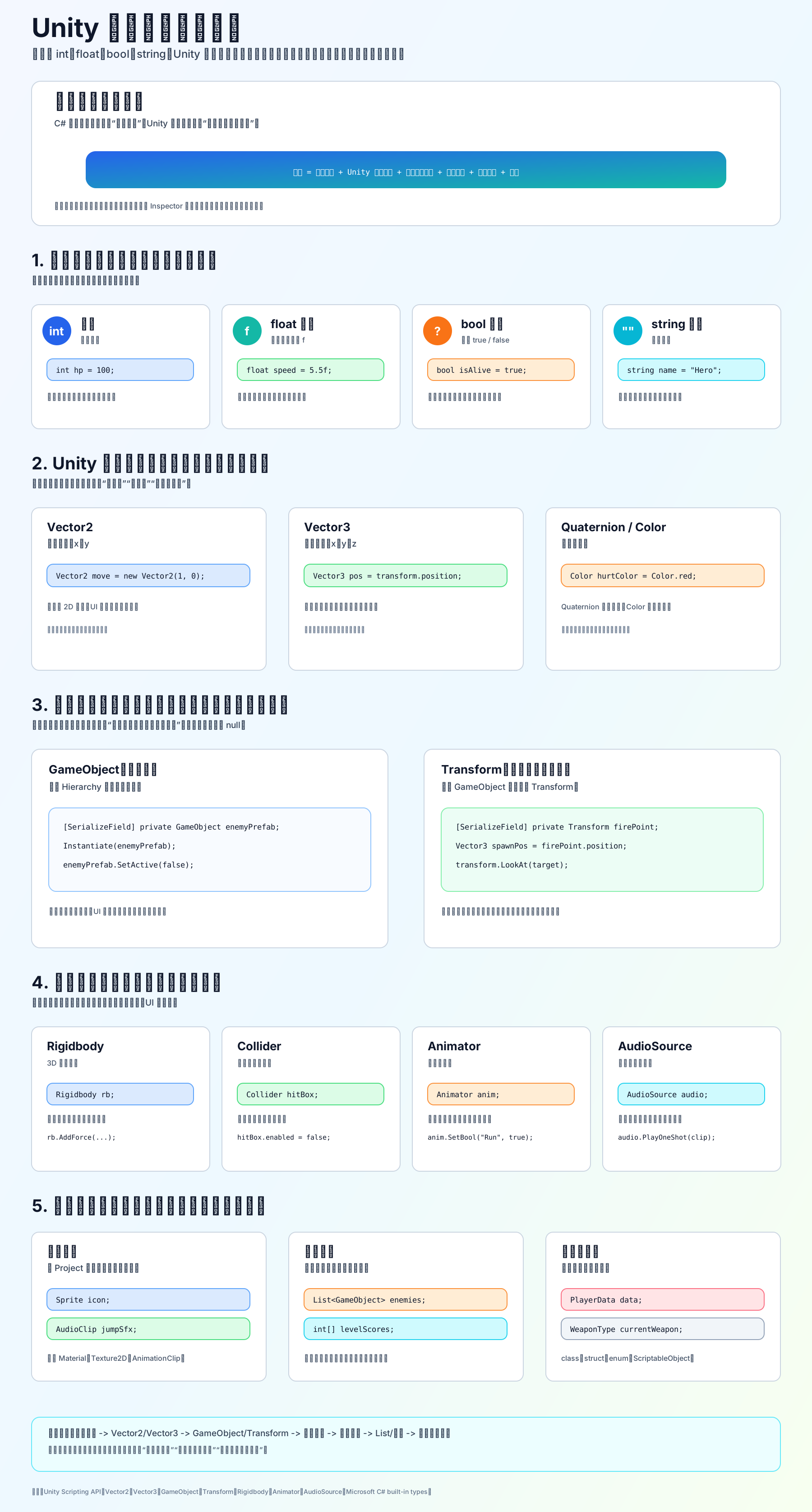
你可以这样理解
C# 变量不是只能装数字和文本,它可以装很多东西:
c
int hp = 100;                  // 数值
float speed = 5f;              // 小数
bool isAlive = true;           // 开关
string playerName = "Hero";    // 文本

Vector3 position;              // 三维坐标
GameObject enemyPrefab;        // 游戏对象
Transform firePoint;           // 发射点位置
Rigidbody rb;                  // 物理刚体组件
Animator animator;             // 动画组件
AudioSource audioSource;       // 声音组件
Sprite icon;                   // 图片资源
List<GameObject> enemies; // 一组敌人Unity 里更常用的变量类型
基础数据:
int:生命值、金币、数量float:速度、时间、距离、冷却bool:是否死亡、是否跳跃、是否暂停string:玩家名、提示文本、存档 key
Unity 数学类型:
Vector2:2D 坐标、方向Vector3:3D 坐标、方向、缩放Quaternion:旋转Color:颜色
场景对象和组件:
GameObject:一个完整游戏对象Transform:位置、旋转、缩放Rigidbody/Rigidbody2D:物理刚体Collider/Collider2D:碰撞体Animator:动画控制AudioSource:播放声音Camera:摄像机Light:灯光
资源类型:
Sprite:2D 图片Texture2D:纹理Material:材质AudioClip:音频片段AnimationClip:动画片段ScriptableObject:配置数据资源
集合和自定义类型:
int[]:数组List<T>:列表Dictionary<TKey, TValue>:字典enum:枚举- 自定义
class/struct
学习顺序
你先别一下子全背。按这个顺序学最稳:
int/float/bool/string -> Vector2/Vector3 -> GameObject/Transform -> Rigidbody/Animator/AudioSource -> Sprite/AudioClip -> List/数组 -> 自定义类型一句话总结: 基础变量描述普通数据,Unity 变量描述游戏世界里的对象、组件、位置、资源和一组数据。
参考链接: