
Appearance
输入系统
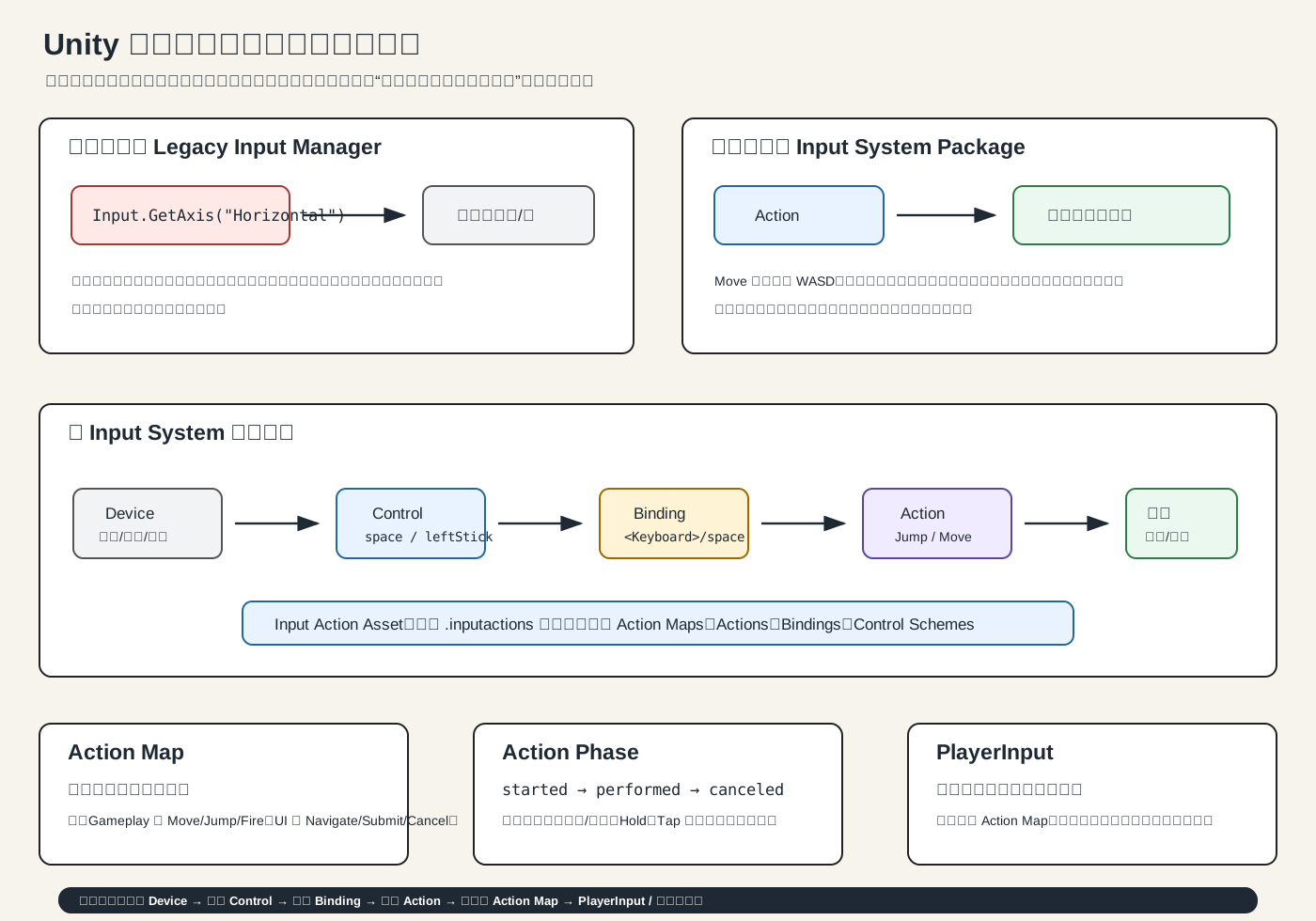
1. 输入系统到底管什么
输入系统负责把“玩家按了什么”变成“游戏要做什么”。
键盘 W        -> Move
手柄左摇杆    -> Move
空格键        -> Jump
手柄 A 键     -> Jump
鼠标左键      -> Fire
触摸按钮 -> Fire核心思想是:不要让角色移动代码关心“到底是 W 还是摇杆”,而是只关心“玩家想移动”。
2. Unity 有两套输入系统
旧系统:
Input.GetKeyDown(KeyCode.Space);
Input.GetAxis("Horizontal");它叫 Legacy Input Manager。老教程很多会用它,简单,但不适合复杂项目。Unity 官方现在推荐新项目用新的 Input System Package,旧系统主要用于维护老项目。
新系统:
Input Action Asset
Action Map
Action
Binding
PlayerInput它更适合:
键鼠 + 手柄
移动端触摸
玩家改键
多人游戏
UI 和游戏输入分离
复杂按键,比如长按、双击、蓄力3. 新输入系统的核心词
你先背这条链:
Device -> Control -> Binding -> Action -> Action Map -> 代码含义是:
Device:设备,比如 Keyboard、Mouse、Gamepad
Control:设备上的具体控件,比如 space、leftStick、leftButton
Binding:把 Control 绑定到 Action,例如 <Keyboard>/space -> Jump
Action:游戏行为,比如 Move、Jump、Fire
Action Map:一组 Action,比如 Gameplay、UI、Vehicle
Input Action Asset:保存这些配置的 .inputactions 文件4. 最推荐的新手工作流
安装或启用
Input System创建
PlayerControls.inputactions建一个 Action Map:
Gameplay添加 Actions:
Move Value / Vector2 Jump Button Fire Button Pause Button给
Move加绑定:c2D Vector Composite: WASD 2D Vector Composite: Arrow Keys <Gamepad>/leftStick给
Jump加绑定:c<Keyboard>/space <Gamepad>/buttonSouth玩家物体上挂
PlayerInput把
.inputactions拖到PlayerInput的ActionsDefault Map选GameplayBehavior推荐新手先选Invoke Unity Events
5. 一个完整移动案例
c
using UnityEngine;
using UnityEngine.InputSystem;

public class PlayerController : MonoBehaviour
{
    [SerializeField] private float moveSpeed = 5f;

    private Vector2 moveInput;

    public void OnMove(InputAction.CallbackContext context)
    {
        moveInput = context.ReadValue<Vector2>();
    }

    public void OnJump(InputAction.CallbackContext context)
    {
        if (!context.performed) return;

        Debug.Log("Jump");
    }

    private void Update()
    {
        Vector3 move = new Vector3(moveInput.x, 0f, moveInput.y);
        transform.Translate(move * moveSpeed * Time.deltaTime, Space.World);
    }
}然后在 PlayerInput 的 Events 里绑定:
c
Gameplay / Move -> PlayerController.OnMove
Gameplay / Jump -> PlayerController.OnJump重点:Move 不要只在按下瞬间移动一次。正确做法是把输入值存到 moveInput,然后在 Update 或 FixedUpdate 里持续使用。
6. started、performed、canceled 是什么
一个 Action 会经历阶段:
c
started    开始了
performed 触发成功
canceled 结束或取消普通跳跃通常只关心:
c
if (context.performed)
{
    Jump();
}长按蓄力就会用到三个阶段:
c
started:显示蓄力条
performed:蓄力成功,发射
canceled:松太早,取消蓄力7. Interactions:按键模式
Interaction 决定“怎样按才算触发”。
常见有:
c
Press      按下
Hold       长按
Tap        短按
SlowTap    慢按
MultiTap 多次点击例子:
c
Fire + Tap       -> 普通射击
Fire + Hold      -> 蓄力射击
Dash + MultiTap -> 双击冲刺8. Processors:处理输入值
Processor 会修改输入值。
常见有:
c
Deadzone    摇杆死区
Normalize   归一化
Invert      反转
Scale       缩放
Clamp 限制范围比如玩家觉得视角上下反了,就可以对 Look 的 Y 轴做 Invert Vector2。
9. Action Map:不同状态用不同输入表
你可以建多个 Action Map:
c
Gameplay:Move、Jump、Fire、Pause
UI:Navigate、Submit、Cancel
Vehicle:Steer、Brake、Boost
Menu:Confirm、Back暂停时切到 UI:
c
using UnityEngine.InputSystem;

public class InputModeSwitcher : MonoBehaviour
{
    [SerializeField] private PlayerInput playerInput;

    public void OpenPauseMenu()
    {
        playerInput.SwitchCurrentActionMap("UI");
    }

    public void ClosePauseMenu()
    {
        playerInput.SwitchCurrentActionMap("Gameplay");
    }
}这比到处写 if (isPaused) return; 干净很多。
10. 常见 API 速查
c
context.ReadValue<Vector2>();
context.performed;
context.started;
context.canceled;
playerInput.SwitchCurrentActionMap("UI");
playerInput.ActivateInput();
playerInput.DeactivateInput();
Keyboard.current.spaceKey.wasPressedThisFrame;
Mouse.current.position.ReadValue();
Gamepad.current.leftStick.ReadValue();前两组是项目里更常用的高层写法。最后一组是直接读设备,适合调试或特殊情况。
11. UI 输入
如果你用新输入系统,UI 里通常要用:
c
Input System UI Input Module而不是旧的:
c
Standalone Input Module否则会出现按钮不能点、键盘导航不工作之类的问题。
12. 最容易犯的错
c
忘了启用 Input System 或 Active Input Handling 没切对
PlayerInput 没拖 .inputactions
Default Action Map 没选
Move 是 Vector2,却绑成普通 Button
代码签名和 PlayerInput Behavior 不匹配
Action 没 Enable,手写 InputAction 时尤其常见
UI 还在用旧 Standalone Input Module
performed 里直接移动,导致角色只动一下
重复注册回调,导致一次按键触发多次13. 你现在该怎么学
学习顺序建议:
c
先会旧系统:Input.GetKeyDown / GetAxis,看懂老教程
重点学新系统:Input Action Asset + PlayerInput
先做 Move / Jump / Fire
再学 UI 和 Action Map 切换
最后学 Hold、Tap、改键、多人记住一句话:
c
旧输入系统是在问“哪个键被按了”。
新输入系统是在问“玩家想做什么动作”。参考资料:Unity 官方 Input System Package、Legacy Input、Actions、PlayerInput、Bindings、Interactions、Processors。