
Appearance
Unity对象与组件API
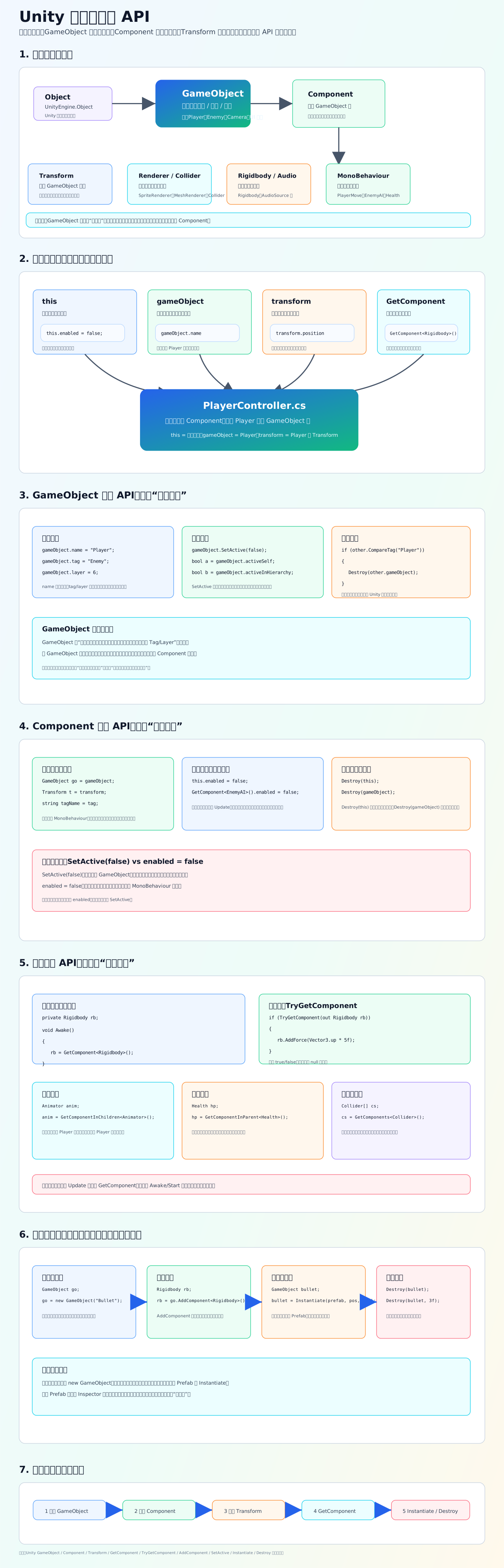
核心理解
Unity 脚本里最常操作的是这三个东西:
GameObject:场景里的对象容器,比如 Player、Enemy、Camera。 Component:挂在 GameObject 上的功能模块,比如 Transform、Collider、Rigidbody、AudioSource、你写的脚本。 Transform:每个 GameObject 必有的组件,负责位置、旋转、缩放、父子层级。
脚本里最常用的入口
c
gameObject        // 当前脚本挂着的那个对象
transform         // 当前对象的 Transform
this              // 当前这个脚本组件自己
GetComponent<T>() // 找组件比如:
c
private Rigidbody rb;

void Awake()
{
    rb = GetComponent<Rigidbody>();
}意思是:脚本启动时,从当前 GameObject 身上找到 Rigidbody 组件,并保存起来。
最常用 API
c
gameObject.name = "Player";
gameObject.SetActive(false);
gameObject.CompareTag("Enemy");

GetComponent<Rigidbody>();
TryGetComponent(out Rigidbody rb);
GetComponentInChildren<Animator>();
GetComponentInParent<Health>();
GetComponents<Collider>();

gameObject.AddComponent<Rigidbody>();
Instantiate(prefab, position, rotation);
Destroy(gameObject);很重要的区别
this.enabled = false:只关闭当前脚本组件。 gameObject.SetActive(false):关闭整个对象,对象上的脚本、碰撞、渲染等都会受影响。 Destroy(this):删除当前脚本组件。 Destroy(gameObject):删除整个对象。
初学建议
先熟练这条链路:
GameObject 是谁 → Component 有什么能力 → Transform 在哪里 → GetComponent 找组件 → Instantiate/Destroy 生成和销毁对象
这组 API 是你以后写移动、攻击、碰撞、交互、UI、敌人、子弹、道具时每天都会用的基本功。
参考链接