
Appearance
数据与存档
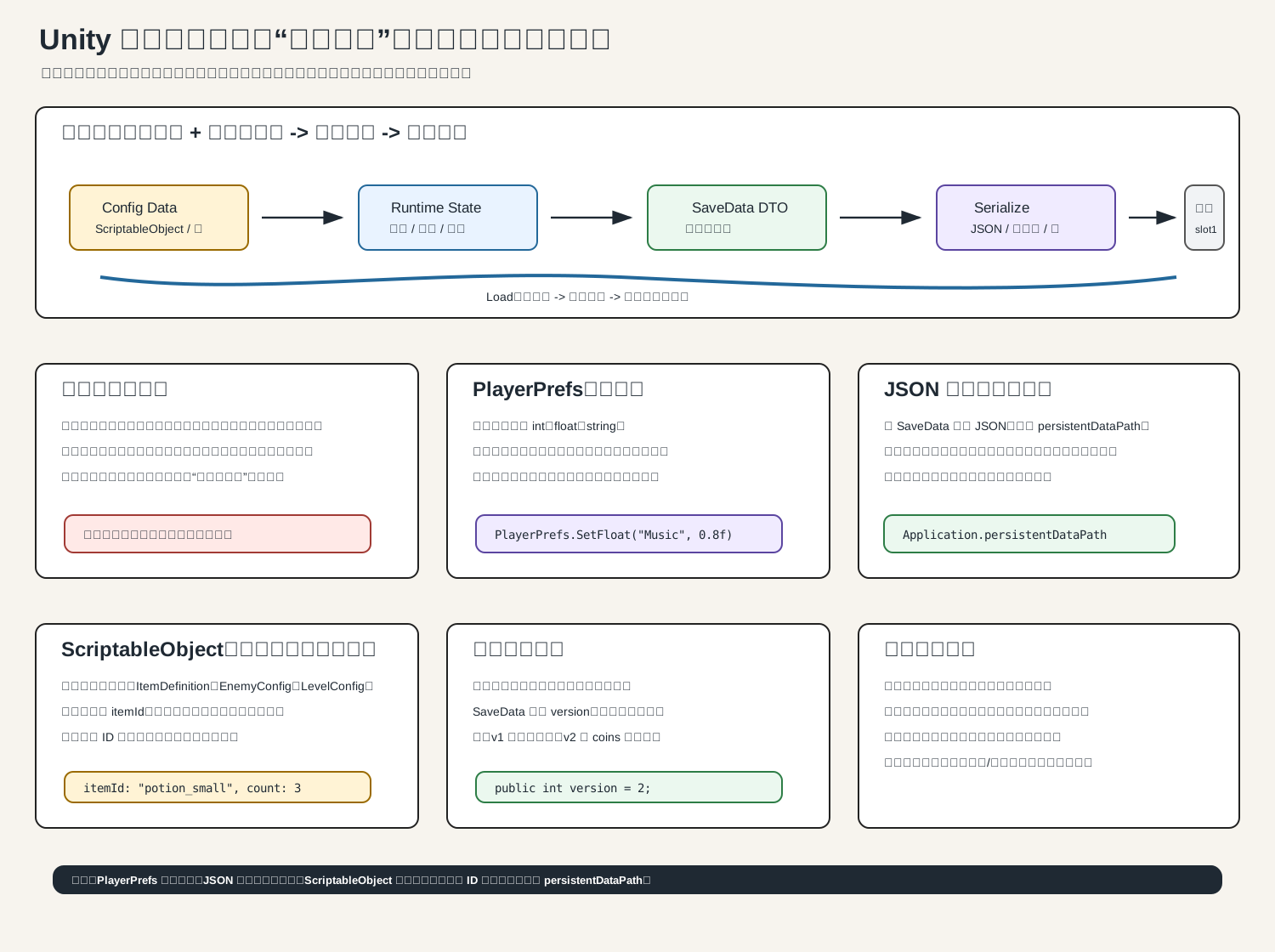
核心一句话
Unity 存档不是“把整个游戏保存一下”,而是:把运行时重要状态整理成纯数据,再写到稳定路径,下次启动时读回来恢复。
先分三类:
c
配置数据:武器表、敌人属性、关卡配置,常用 ScriptableObject
运行时数据:当前血量、金币、位置、任务进度
存档数据:从运行时数据里挑出下次要恢复的部分PlayerPrefs:只存小设置
适合:
音量
画质
语言
是否看过新手引导
最高分不适合完整游戏存档。Unity 官方说明 PlayerPrefs 存 int / float / string,且本地无加密,不要存敏感数据。
c
PlayerPrefs.SetFloat("MusicVolume", 0.8f);
PlayerPrefs.SetInt("TutorialDone", 1);
PlayerPrefs.Save();

float volume = PlayerPrefs.GetFloat("MusicVolume", 1f);JSON 文件:最常见游戏存档
存档路径用:
c
Application.persistentDataPath它是 Unity 给你的持久化目录,用来保存跨启动仍然保留的数据。不要把运行时存档写到 Assets。
一个最小存档结构:
c
using System;
using System.Collections.Generic;

[Serializable]
public class SaveData
{
    public int version = 1;
    public int level = 1;
    public int coins = 0;
    public float playerX;
    public float playerY;
    public float playerZ;
    public List<ItemSaveData> items = new();
}

[Serializable]
public class ItemSaveData
{
    public string itemId;
    public int count;
}保存和读取:
c
using System.IO;
using UnityEngine;

public static class SaveSystem
{
    private static string PathForSlot(int slot)
    {
        return Path.Combine(Application.persistentDataPath, $"save_{slot}.json");
    }

    public static void Save(int slot, SaveData data)
    {
        string json = JsonUtility.ToJson(data, true);
        string path = PathForSlot(slot);

        Directory.CreateDirectory(Application.persistentDataPath);
        File.WriteAllText(path, json);
    }

    public static SaveData Load(int slot)
    {
        string path = PathForSlot(slot);

        if (!File.Exists(path))
            return new SaveData();

        string json = File.ReadAllText(path);
        return JsonUtility.FromJson<SaveData>(json);
    }
}Unity 官方 JsonUtility 使用 Unity 的序列化规则:主要序列化字段,而且字段类型要受支持。所以新手先避免直接存:
c
Dictionary
复杂对象引用
GameObject
Transform
MonoBehaviour
ScriptableObject 实例引用ScriptableObject
配置数据,不是玩家存档本体 比如你有物品配置:
c
ItemDefinition
- id: potion_small
- displayName: Small Potion
- healAmount: 30
- icon存档里不要保存整个 ItemDefinition,只保存:
c
itemId = "potion_small"
count = 3加载时再通过 itemId 去配置表里查。这是项目做大的关键习惯。
什么时候保存
常见保存时机:
c
过关
进入检查点
打开菜单点击保存
获得重要道具
OnApplicationPause
OnApplicationQuit不要每帧保存。硬盘写入比改内存慢很多。
存档要有版本号
以后游戏更新,存档结构会变:
c
v1:只有 level、coins
v2:新增 playerPosition
v3:新增 questProgress所以 SaveData 里放:
c
public int version = 1;加载旧存档时可以补默认值或迁移数据。
常见坑
c
用 PlayerPrefs 存完整背包和任务进度
把 GameObject / Transform 直接塞进存档
存档写到 Assets,打包后路径不对
JsonUtility 序列化 Dictionary 失败
忘记 [Serializable]
字段用 private 且没加 [SerializeField]
只保存物品名字,不保存稳定 id
游戏更新后旧存档无法读取
没有处理存档文件不存在或损坏记住口诀:
c
PlayerPrefs 存小设置。
JSON 文件存游戏进度。
ScriptableObject 存配置。
存档里存 ID 和数值。
路径用 persistentDataPath。参考:Unity 官方 PlayerPrefs、JsonUtility、Application.persistentDataPath、ScriptableObject。