
Appearance
Button (Legacy)
NOTE
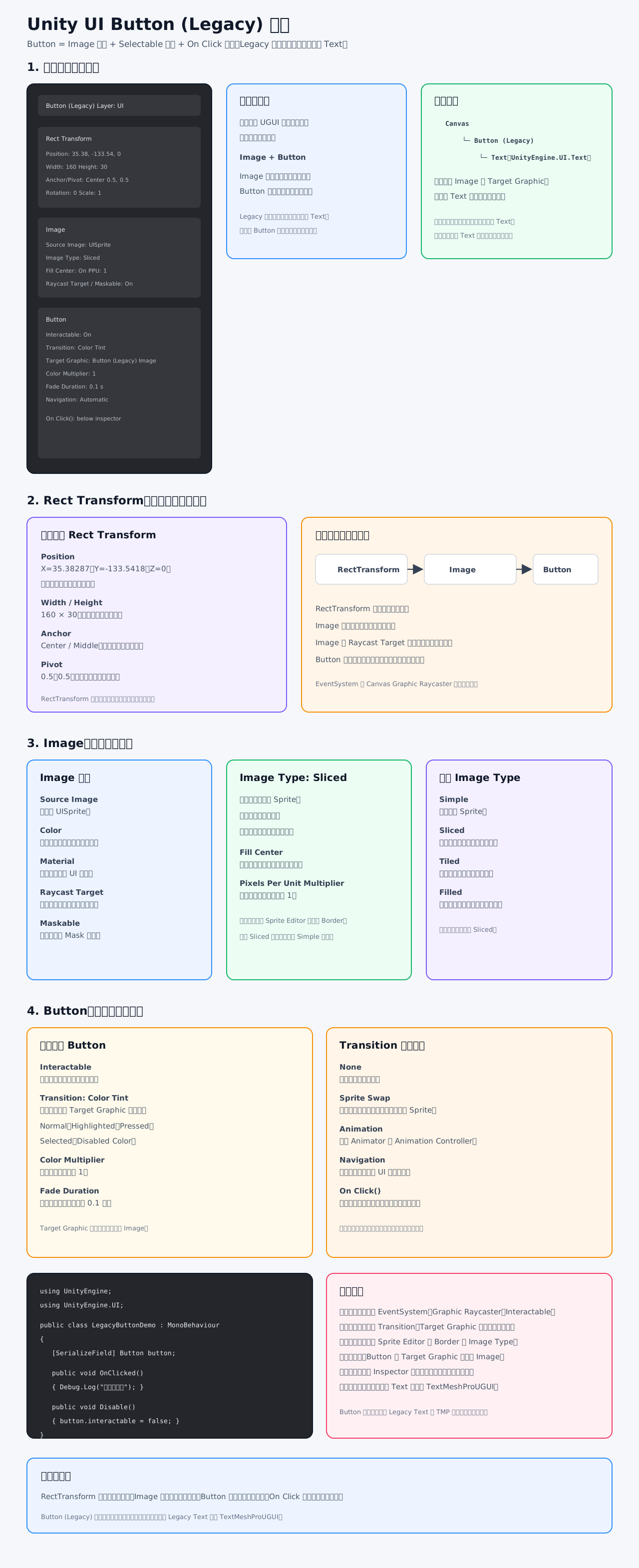
这是旧版 UGUI 的 Button (Legacy),但它的点击逻辑和 TMP Button 基本相同,主要区别在于按钮文字通常使用旧版 Text。
一、整体组成
c
Button (Legacy)
├── RectTransform
├── CanvasRenderer
├── Image
├── Button
└── Text(子物体,可选)RectTransform:决定位置和大小。Image:绘制按钮背景并接收射线。Button:处理悬停、按下、禁用和点击。Text:显示按钮文字。
二、Rect Transform
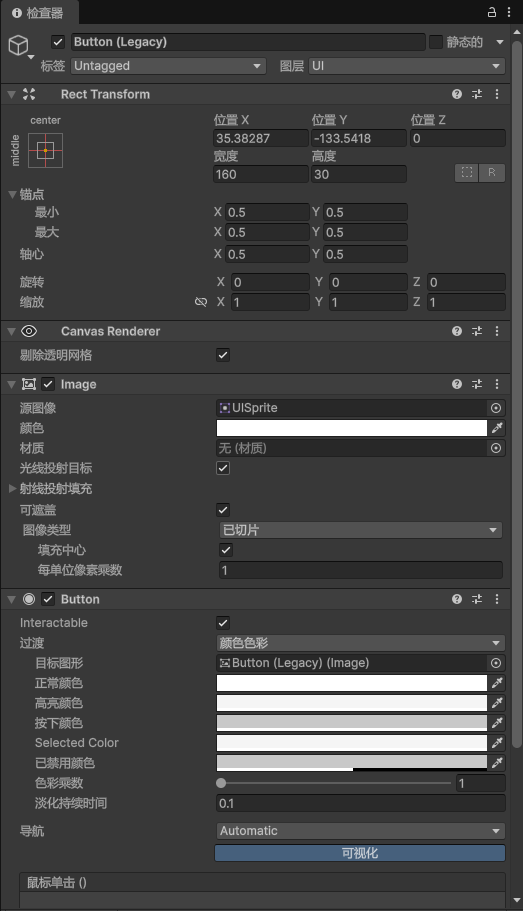
截图中的值:
Position:X=35.38287,Y=-133.5418,Z=0Width:160Height:30Anchor:中心Pivot:0.5, 0.5Rotation:0, 0, 0Scale:1, 1, 1
RectTransform 决定按钮在哪里、占多大区域。按钮太小可能导致背景、文字或点击区域显示异常。
三、Image 组件
Source Image
当前为:
c
UISprite它是按钮的背景 Sprite。
Image Type
当前为:
c
Sliced即九宫格切片:
c
四个角保持不变
边缘进行拉伸
中心区域进行填充适合按钮、面板和窗口背景。
要让 Sliced 正常工作,需要在 Sprite Editor 中设置 Sprite 的 Border。
Fill Center
- 开启:绘制中间区域。
- 关闭:中间区域透明或不填充。
Pixels Per Unit Multiplier
当前为 1,用于调整 Sprite 像素单位比例。
Raycast Target
开启后,Image 可以接收鼠标或触摸射线。Button 通常依赖它被点击。
Maskable
开启后,按钮可以被父级 Mask 或 RectMask2D 裁剪。
四、Button 组件
Interactable
当前开启,表示按钮可以交互。
关闭后:
- 无法点击。
- 使用
Disabled Color。 - 不再触发
On Click()。
Transition
当前为:
c
Color Tint它会根据按钮状态改变 Target Graphic 的颜色。
常见状态:
Normal Color:正常。Highlighted Color:鼠标悬停。Pressed Color:按下。Selected Color:键盘或手柄选中。Disabled Color:不可交互。
Target Graphic
当前为:
c
Button (Legacy) (Image)说明颜色变化作用于按钮背景 Image,不会自动改变子物体 Text 的颜色。
Color Multiplier
当前为 1,表示不额外放大颜色。
Fade Duration
当前为 0.1 秒,表示状态颜色切换的过渡时间。
Navigation
当前为 Automatic,Unity 会自动寻找键盘或手柄的下一个 UI 控件。
On Click()
截图底部只显示了标题,事件列表位于更下方。
绑定步骤:
- 点击
+。 - 拖入目标 GameObject。
- 选择脚本中的
public void方法。 - 运行游戏点击测试。
Unity 官方定义中,Button 通常在用户点击并松开时触发 On Click()。Button 官方文档
五、代码示例
c
using UnityEngine;
using UnityEngine.UI;

public class LegacyButtonDemo : MonoBehaviour
{
    [SerializeField] private Button button;

    public void OnClicked()
    {
        Debug.Log("按钮被点击");
    }

    public void DisableButton()
    {
        button.interactable = false;
    }
}也可以通过代码监听:
c
private void Start()
{
    button.onClick.AddListener(OnClicked);
}六、Button Legacy 与 TMP Button
两者的 Button 逻辑基本相同:
c
Button Legacy:
Image + Button + Legacy Text

TMP Button:
Image + Button + TextMeshProUGUI区别主要是文字组件:
- Legacy Button:使用
UnityEngine.UI.Text。 - TMP Button:使用
TextMeshProUGUI。 - Button 的点击事件、Transition 和 Navigation 基本一致。
新项目通常建议使用 TextMeshProUGUI。Selectable 的 Color Tint、Sprite Swap 和 Animation 过渡规则可参考 Unity 官方文档。Selectable 过渡选项
七、常见问题
- 按钮无反应:检查
EventSystem、Graphic Raycaster和Interactable。 - 背景颜色不变化:检查
Target Graphic和 Transition。 - 九宫格变形:检查 Sprite Editor 的 Border。
- 文字颜色不变:Button 默认只影响 Image,不影响子物体 Text。
- 文字挡住点击:关闭子物体 Text 的
Raycast Target。 - 点击执行两次:检查 Inspector 和代码是否重复绑定。
- 新项目文字效果较差:把子物体 Legacy Text 替换为 TextMeshProUGUI。